Members
Properties:
| Name | Type | Description |
|---|---|---|
SATELLITE |
number | |
OCEANS |
number | |
HILLSHADE |
number |
See:
Properties:
| Name | Type | Description |
|---|---|---|
NONE |
number | 不符合椭圆表面的直线. |
GEODESIC |
number | 循大地测量道. |
RHUMB |
number | 沿着rhumb或loxodrome路径. |
Properties:
| Name | Type | Description |
|---|---|---|
X |
number | 注意X轴. |
Y |
number | 注意Y轴. |
Z |
number | 注意Z轴. |
Properties:
| Name | Type | Description |
|---|---|---|
AERIAL |
string | Aerial imagery. |
AERIAL_WITH_LABELS |
string | 空中图像,上面有公路. |
AERIAL_WITH_LABELS_ON_DEMAND |
string | 空中图像,上面有公路. |
ROAD |
string | 没有额外图像的道路. |
ROAD_ON_DEMAND |
string | 没有额外图像的道路. |
CANVAS_DARK |
string | 暗版路线图. |
CANVAS_LIGHT |
string | 轻版路线图. |
CANVAS_GRAY |
string | 灰色尺度版路线图. |
ORDNANCE_SURVEY |
string | 大地测量图象. 这幅图像只见于英国伦敦地区. |
COLLINS_BART |
string | 柯林斯·巴特图像. |
See:
Properties:
| Name | Type | Description |
|---|---|---|
ADD |
number | 像素值是按组件添加的。 用于添加剂混合,用于透明. |
SUBTRACT |
number | 像素值按组件(来源-目的地)减去. 这用于α混合,用于半透明. |
REVERSE_SUBTRACT |
number | 像素值按组分(命运 - 来源)减去. |
MIN |
number | Pixel values are given to the minimum function (min(source, destination)). 此方程在每个像素颜色组件上运行 . |
MAX |
number | Pixel values are given to the maximum function (max(source, destination)). 此方程在每个像素颜色组件上运行 . |
Properties:
| Name | Type | Description |
|---|---|---|
ZERO |
number | 混合因子为0. |
ONE |
number | 混合因子为一. |
SOURCE_COLOR |
number | 混合因子为源色. |
ONE_MINUS_SOURCE_COLOR |
number | 混合因子为1减去源色. |
DESTINATION_COLOR |
number | 混合因子是目的地颜色. |
ONE_MINUS_DESTINATION_COLOR |
number | 混合因子为1减去目的地颜色. |
SOURCE_ALPHA |
number | 混合因子为源α. |
ONE_MINUS_SOURCE_ALPHA |
number | 混合因子为1减去源α. |
DESTINATION_ALPHA |
number | 混合因子是目的地α. |
ONE_MINUS_DESTINATION_ALPHA |
number | 混合因子为1减去目的地α. |
CONSTANT_COLOR |
number | 混合因子是常态. |
ONE_MINUS_CONSTANT_COLOR |
number | 混合因子为1减常色. |
CONSTANT_ALPHA |
number | 混合因子是常数α. |
ONE_MINUS_CONSTANT_ALPHA |
number | 混合因子为1减去常数α. |
SOURCE_ALPHA_SATURATE |
number | 混合因子是饱和源α. |
Properties:
| Name | Type | Description |
|---|---|---|
OPAQUE |
number | 收藏中的告示牌,点数,或标签完全不透明. |
TRANSLUCENT |
number | 收藏中的告示牌,点数,或标签完全透明. |
OPAQUE_AND_TRANSLUCENT |
number | 收藏中的告示牌,分数,或标签既不透明又透明. |
Properties:
| Name | Type | Description |
|---|---|---|
LEFT_DRAG |
number | 鼠标左键按下,然后移动鼠标并释放按钮. |
RIGHT_DRAG |
number | 鼠标右键按下,然后移动鼠标并释放按钮. |
MIDDLE_DRAG |
number | 鼠标中键按下,然后移动鼠标并释放按钮. |
WHEEL |
number | 滚动鼠标中键. |
PINCH |
number | 触摸表面两指触. |
当使用 NT#0 REPLACE NT 1 或 NT 2 MI NT 3 时,源色是一个glTF材料,技术必须指定
3DTILESDIFFUSE 对散色参数的语义. 否则只支持 NT 2 HighLightT NT 3 .
其颜色评价为白色(1.0、1.0、1.0)的特性总是不掺杂颜色,无论颜色如何 瓷砖的颜色混合模式.
"techniques": {
  "technique0": {
    "parameters": {
      "diffuse": {
        "semantic": "_3DTILESDIFFUSE",
        "type": 35666
      }
    }
  }
}
Properties:
| Name | Type | Description |
|---|---|---|
HIGHLIGHT |
number | 将源色乘以特征色. |
REPLACE |
number | 用特性颜色取代源颜色. |
MIX |
number | 混合源色和特征色. |
Properties:
| Name | Type | Description |
|---|---|---|
TERRAIN |
number | 只有地形才会被分类. |
CESIUM_3D_TILE |
number | 只有3D梯子会被分类. |
BOTH |
number | 地形和3D梯都将被分类. |
classProperty : MetadataClassProperty
Clock#tick to determine behavior
when Clock#startTime or Clock#stopTime is reached.
Properties:
| Name | Type | Description |
|---|---|---|
UNBOUNDED |
number | Clock#tick will always advances the clock in its current direction. |
CLAMPED |
number | When Clock#startTime or Clock#stopTime is reached,
Clock#tick will not advance Clock#currentTime any further. |
LOOP_STOP |
number | When Clock#stopTime is reached, Clock#tick will advance
Clock#currentTime to the opposite end of the interval. When
time is moving backwards, Clock#tick will not advance past
Clock#startTime |
See:
Clock#tick.
Properties:
| Name | Type | Description |
|---|---|---|
TICK_DEPENDENT |
number | Clock#tick advances the current time by a fixed step,
which is the number of seconds specified by Clock#multiplier. |
SYSTEM_CLOCK_MULTIPLIER |
number | Clock#tick advances the current time by the amount of system
time elapsed since the previous call multiplied by Clock#multiplier. |
SYSTEM_CLOCK |
number | Clock#tick sets the clock to the current system time;
忽略所有其他设置. |
See:
CloudCollection in CloudCollection#add.
Properties:
| Name | Type | Description |
|---|---|---|
CUMULUS |
number | Cumulus cloud. |
- Model.colorBlendMode
Properties:
| Name | Type | Description |
|---|---|---|
HIGHLIGHT |
number | |
REPLACE |
number | |
MIX |
number |
See:
Properties:
| Name | Type | Description |
|---|---|---|
BYTE |
number | 8-bit signed byte corresponding to gl.BYTE and the type
中的元素. |
UNSIGNED_BYTE |
number | 8-bit unsigned byte corresponding to UNSIGNED_BYTE and the type
中的元素. |
SHORT |
number | 16 位签名短于 NT 0 SHORT NT 1 和类型 中的元素. |
UNSIGNED_SHORT |
number | 16-bit unsigned short corresponding to UNSIGNED_SHORT and the type
中的元素. |
INT |
number | 32 位签名 int 对应 NT 0 INT NT 1 和类型 中的元素. |
UNSIGNED_INT |
number | 32-bit unsigned int corresponding to UNSIGNED_INT and the type
中的元素. |
FLOAT |
number | 32位浮点对应 NT 0 FLOAT NT 1 和类型 中的元素. |
DOUBLE |
number | 64-bit floating-point corresponding to gl.DOUBLE (in Desktop OpenGL;
this is not supported in WebGL, and is emulated in Cesium via GeometryPipeline.encodeAttribute)
和 NT 0 Float64Array NT 1 中的元素类型. |
- The Corridor Demo
demonstrates the three corner types, as used by
CorridorGraphics.
Properties:
| Name | Type | Description |
|---|---|---|
ROUNDED |
number |  角有光滑的边缘.
 |
MITERED |
number |  角点是相邻边缘的交叉点.
 |
BEVELED |
number |  角落被剪断.
 |
Demo:
Properties:
| Name | Type | Description |
|---|---|---|
FRONT |
number | 前立面三角形呈弯曲状. |
BACK |
number | 后立面三角形呈弯曲状. |
FRONT_AND_BACK |
number | 前立面和后立面的三角形都是凹凸的. |
CustomShader will be added to the
碎片遮蔽器。 这决定了阴影器如何与材料相互作用.
Properties:
| Name | Type | Description |
|---|---|---|
MODIFY_MATERIAL |
string | 将使用自定义阴影来修改材料阶段的结果 在应用照明之前. |
REPLACE_MATERIAL |
string | 将使用定制的遮阳器,而不是材料级. 这是个提示 优化材料处理代码. |
Experimental
This feature is using part of the 3D Tiles spec that is not final and is subject to change without Cesium's standard deprecation policy.
CustomShader handles translucency compared with the original
primitive.
Properties:
| Name | Type | Description |
|---|---|---|
INHERIT |
number | 从原始材料中继承半透明设置. 如果原始人使用了 半透明材料,定制的遮阳器也将被认为是半透明. 如果原始人 使用不透明材料,自定义阴影将被视为不透明. |
OPAQUE |
number | 强迫原始人使原始人变得不透明,忽略任何物质设置. |
TRANSLUCENT |
number | 强迫原始人使原始人变得半透明,忽略任何物质设置. |
Experimental
This feature is using part of the 3D Tiles spec that is not final and is subject to change without Cesium's standard deprecation policy.
Properties:
| Name | Type | Description |
|---|---|---|
NEVER |
number | 深度测试从未通过. |
LESS |
number | 如果进入的深度小于存储的深度,深度测试就会通过. |
EQUAL |
number | 如果进入的深度与存储的深度相等,深度测试就会通过. |
LESS_OR_EQUAL |
number | 如果进入的深度小于或等于存储的深度,深度测试即通过. |
GREATER |
number | 如果进入的深度大于存储的深度,则深度测试通过. |
NOT_EQUAL |
number | 如果进入的深度与存储的深度不相等,深度测试就会通过. |
GREATER_OR_EQUAL |
number | 如果进入的深度大于或等于存储的深度,深度测试即通过. |
ALWAYS |
number | 深度测试总是通过. |
Properties:
| Name | Type | Description |
|---|---|---|
NONE |
number | 不要使用动态大气照明. 大气层照明效应将 而不是用场景的光源. |
SCENE_LIGHT |
number | 利用现场目前光源进行动态大气照明. |
SUNLIGHT |
number | 迫使大气中充满活力的光线 永远使用阳光的方向, 即使现场使用不同的光源. |
Properties:
| Name | Type | Description |
|---|---|---|
NONE |
number | 不进行推断. |
HOLD |
number | 在样本数据范围之外使用第一个或最后一个值. |
EXTRAPOLATE |
number | 值为推断. |
See:
GeocoderService.
Properties:
| Name | Type | Description |
|---|---|---|
SEARCH |
number | 进行输入被视为完整的搜索 . |
AUTOCOMPLETE |
number | 通常使用部分输入进行自动完成 用于作为用户提供可能的结果. |
See:
constant geometryUpdaters : Array.<GeometryUpdater>
Properties:
| Name | Type | Description |
|---|---|---|
NONE |
number | No encoding |
LERC |
number | LERC encoding |
Properties:
| Name | Type | Description |
|---|---|---|
NONE |
number | 立场是绝对的. |
CLAMP_TO_GROUND |
number | The position is clamped to the terrain and 3D Tiles. When clamping to 3D Tilesets such as photorealistic 3D Tiles, ensure the tileset has Cesium3DTileset#enableCollision set to true. Otherwise, the entity may not be correctly clamped to the tileset surface. |
RELATIVE_TO_GROUND |
number | 位置高度是地上高度和3D平面. |
CLAMP_TO_TERRAIN |
number | 位置被夹在断层上. |
RELATIVE_TO_TERRAIN |
number | 位置高度是地形之上的高度. |
CLAMP_TO_3D_TILE |
number | 位置被夹在3D梯子上. |
RELATIVE_TO_3D_TILE |
number | 位置高度是3D梯度以上的高度. |
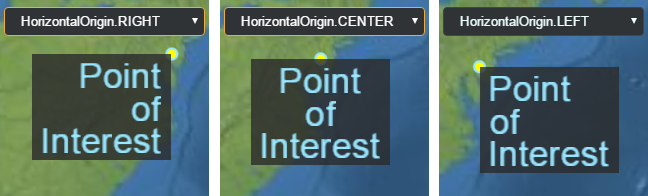
Billboard
or Label. For example, setting the horizontal origin to LEFT
or RIGHT will display a billboard to the left or right (in screen space)
在锚位置.
Properties:
| Name | Type | Description |
|---|---|---|
CENTER |
number | 该起源位于物体的横向中心. |
LEFT |
number | 起源位于物体的左侧. |
RIGHT |
number | 起源位于物体的右侧. |
See:
type parameter of drawElements.
Properties:
| Name | Type | Description |
|---|---|---|
UNSIGNED_BYTE |
number | 8-bit unsigned byte corresponding to UNSIGNED_BYTE and the type
中的元素. |
UNSIGNED_SHORT |
number | 16-bit unsigned short corresponding to UNSIGNED_SHORT and the type
中的元素. |
UNSIGNED_INT |
number | 32-bit unsigned int corresponding to UNSIGNED_INT and the type
中的元素. |
Properties:
| Name | Type | Description |
|---|---|---|
OUTSIDE |
number | 表示一个物体不包含在节内. |
INTERSECTING |
number | 代表一个物体与其中的飞机相交. |
INSIDE |
number | 表示一个物体完全在节内. |
Properties:
| Name | Type | Description |
|---|---|---|
GOOGLE |
string | 谷歌地理编码器,用于谷歌数据. |
BING |
string | 炳地理编码器,与炳数据使用. |
DEFAULT |
string | 使用服务器上设定的默认地理编码器 。 双关或双关 谷歌数据被使用. |
createWorldImagery.
Properties:
| Name | Type | Description |
|---|---|---|
AERIAL |
number | Aerial imagery. |
AERIAL_WITH_LABELS |
number | 空中图像,上面有公路. |
ROAD |
number | 没有额外图像的道路. |
Properties:
| Name | Type | Description |
|---|---|---|
SHIFT |
number | 代表被扣的转折键. |
CTRL |
number | 代表被扣下的控制键. |
ALT |
number | 代表了被扣的备用键. |
Properties:
| Name | Type | Description |
|---|---|---|
FILL |
number | 填充标签的文本, 但不要大纲 . |
OUTLINE |
number | 概述标签的文本, 但不要填充 . |
FILL_AND_OUTLINE |
number | 填充并概述标签的文本. |
See:
Model .
Properties:
| Name | Type | Description |
|---|---|---|
UNLIT |
number | Use unlit shading, i.e. skip lighting calculations. The model's 散色( 假定为线性 NT% 0 ,而非 sRGB) 直接使用 当计算 NT 0 out FragColor NT 1 时. 阿尔法模式仍然 applied. |
PBR |
number | 采用物理渲染照明计算. 这包括: 金属粗糙度和光谱光泽度 基于图像 在可能的情况下,还采用照明. |
Experimental
This feature is using part of the 3D Tiles spec that is not final and is subject to change without Cesium's standard deprecation policy.
magnificationFilter : TextureMagnificationFilter
TextureMagnificationFilter .
-
Default Value:
TextureMagnificationFilter.LINEAR
Properties:
| Name | Type | Description |
|---|---|---|
ROTATE |
number | 2D地图可以围绕z轴旋转. |
INFINITE_SCROLL |
number | 2D映射可以无限地向水平方向滚动. |
readonly metadata : Array.<Int8Array>|Array.<Uint8Array>|Array.<Int16Array>|Array.<Uint16Array>|Array.<Int32Array>|Array.<Uint32Array>|Array.<Float32Array>|Array.<Float64Array>
Properties:
| Name | Type | Description |
|---|---|---|
INT8 |
string | 8 位签名整数 |
UINT8 |
string | 8 位无符号整数 |
INT16 |
string | 16 位签名整数 |
UINT16 |
string | 16 位无符号整数 |
INT32 |
string | 32 位签名整数 |
UINT32 |
string | 32 位无符号整数 |
INT64 |
string | 64位签名整数. |
UINT64 |
string | 64位签名整数. |
FLOAT32 |
string | 32 位( 单精度) 浮点数 |
FLOAT64 |
string | 一个64位(双精度)浮点数 |
Experimental
This feature is using part of the 3D Tiles spec that is not final and is subject to change without Cesium's standard deprecation policy.
MetadataComponentType
Properties:
| Name | Type | Description |
|---|---|---|
SCALAR |
string | 单一组成部分 |
VEC2 |
string | 具有两个组件的矢量 |
VEC3 |
string | 含有三个组件的矢量 |
VEC4 |
string | 具有四个组件的矢量 |
MAT2 |
string | 2x2矩阵,以列主格式存储. |
MAT3 |
string | 3x3矩阵,以列主格式存储. |
MAT4 |
string | 4x4矩阵,以列主要格式存储. |
BOOLEAN |
string | 布尔值( 真/ 假) |
STRING |
string | 编码字符串值 |
ENUM |
string | 一个被列举的价值。 此类型与 MetadataEnum 一起用于描述有效值. |
Experimental
This feature is using part of the 3D Tiles spec that is not final and is subject to change without Cesium's standard deprecation policy.
minificationFilter : TextureMinificationFilter
TextureMinificationFilter .
-
Default Value:
TextureMinificationFilter.LINEAR
Properties:
| Name | Type | Description |
|---|---|---|
NONE |
number | 播放动画一次; 不要循环它 . |
REPEAT |
number | 在动画停止后立即从头开始循环播放. |
MIRRORED_REPEAT |
number | 循环动画。 先是向前播放,然后逆向播放,然后向前播放,等等. |
See:
readonly of : Scene|undefined
CesiumWidget#scene that the tileset will be rendered in, required for tilesets that specify a heightReference value for clamping 3D Tiles vector data content- like points, lines, and labels- to terrain or 3D tiles.
-
Default Value:
undefined
Properties:
| Name | Type | Description |
|---|---|---|
UNSIGNED_BYTE |
number | |
UNSIGNED_SHORT |
number | |
UNSIGNED_INT |
number | |
FLOAT |
number | |
HALF_FLOAT |
number | |
UNSIGNED_INT_24_8 |
number | |
UNSIGNED_SHORT_4_4_4_4 |
number | |
UNSIGNED_SHORT_5_5_5_1 |
number | |
UNSIGNED_SHORT_5_6_5 |
number |
See:
Properties:
| Name | Type | Description |
|---|---|---|
DEPTH_COMPONENT |
number | 包含深度值的像素格式. |
DEPTH_STENCIL |
number | 一个包含深度和stencil值的像素格式,最常使用 PixelDatatype.UNSIGNED_INT_24_8 . |
ALPHA |
number | 包含α通道的像素格式. |
RED |
number | 包含红色通道的像素格式 |
RG |
number | 包含红绿通道的像素格式. |
RGB |
number | 包含红,绿,蓝通道的像素格式. |
RGBA |
number | 包含红色,绿色,蓝色和α通道的像素格式. |
RED_INTEGER |
number | 含有红色通道作为整数的像素格式. |
RG_INTEGER |
number | 包含红绿通道作为整数的像素格式. |
RGB_INTEGER |
number | 一个像素格式,包含红色,绿色和蓝色的通道作为整数. |
RGBA_INTEGER |
number | 包含红色,绿色,蓝色和α通道作为整数的像素格式. |
LUMINANCE |
number | 包含亮度(强度)通道的像素格式. |
LUMINANCE_ALPHA |
number | 包含亮度(强度)和α通道的像素格式. |
RGB_DXT1 |
number | 包含红,绿,蓝三色通道的像素格式是 NT 0 压缩的. |
RGBA_DXT1 |
number | 包含红,绿,蓝,和α通道的像素格式是 DXT1 压缩的. |
RGBA_DXT3 |
number | 包含红,绿,蓝,和α通道的像素格式是 DXT3 压缩的. |
RGBA_DXT5 |
number | 包含红,绿,蓝,和α通道的像素格式是 DXT5 压缩的. |
RGB_PVRTC_4BPPV1 |
number | 包含红,绿,蓝等色通道的像素格式是 NT 0 4bpp 压缩. |
RGB_PVRTC_2BPPV1 |
number | 包含红色,绿色,和蓝色通道的像素格式是 NT 0 2bpp 压缩. |
RGBA_PVRTC_4BPPV1 |
number | 包含红,绿,蓝,和α通道的像素格式是 NT 0 4bpp 压缩. |
RGBA_PVRTC_2BPPV1 |
number | 包含红,绿,蓝,和α通道的像素格式是 PVR 2bpp 压缩. |
RGBA_ASTC |
number | 包含红,绿,蓝,和α通道的像素格式是 ASTC 压缩的. |
RGB_ETC1 |
number | 包含红,绿,蓝三色通道的像素格式是 NT 0 压缩的. |
RGB8_ETC2 |
number | 包含红,绿,蓝三色通道的像素格式是 NT 0 压缩的. |
RGBA8_ETC2_EAC |
number | 包含红,绿,蓝,和α通道的像素格式是 ETC2 压缩的. |
RGBA_BC7 |
number | 包含红,绿,蓝,和α通道的像素格式是 BC7 压缩的. |
PostProcessStage is sampled.
Properties:
| Name | Type | Description |
|---|---|---|
NEAREST |
number | 以返回最接近的 Texel 为纹理样本. |
LINEAR |
number | 通过四个距离最近的特克塞尔的双线插值来样本纹理. |
Properties:
| Name | Type | Description |
|---|---|---|
POINTS |
number | 原始点,每个顶点(或索引)是一个单独的点. |
LINES |
number | 线条原始,每两个顶点(或指数)是一个线段. 线路段不一定相连. |
LINE_LOOP |
number | 线圈原始,第一个线圈连接后每个顶点(或索引)与 上一个顶点,上一个顶点隐含连接到第一个顶点. |
LINE_STRIP |
number | 线条原始,在第一个顶点后,每个顶点(或索引)都会将一个线连接到之前的顶点. |
TRIANGLES |
number | 三角形原始,每三个顶点(或指数)是一个三角形. 三角不一定共享边缘. |
TRIANGLE_STRIP |
number | 三角带原始,在前两个连接后每个顶点(或索引) 前两个顶点形成三角形。 例如,这可以用来建模一堵墙. |
TRIANGLE_FAN |
number | 前两个顶点连接后每个顶点( 或索引) 的三角扇原始 前一个顶点和第一个顶点形成三角形。 例如,这个可以使用 用来模拟圆锥或圆圈. |
Properties:
| Name | Type | Description |
|---|---|---|
FIXED |
number | 固定帧. |
INERTIAL |
number | 惯性框架. |
Properties:
| Name | Type | Description |
|---|---|---|
UNISSUED |
number | 初始未发行状态. |
ISSUED |
number | 已发行但尚未启用。 当空位可用时会生效 . |
ACTIVE |
number | 已发出实际的http请求. |
RECEIVED |
number | 请求成功完成 . |
CANCELLED |
number | 由于优先权较低,请求被明确或自动取消. |
FAILED |
number | Request failed. |
Properties:
| Name | Type | Description |
|---|---|---|
TERRAIN |
number | Terrain request. |
IMAGERY |
number | Imagery request. |
TILES3D |
number | 3D梯队请求. |
OTHER |
number | Other request. |
Properties:
| Name | Type | Description |
|---|---|---|
MORPHING |
number | 在模式间进行解析, NT 0 ., 3D对2D. |
COLUMBUS_VIEW |
number | 哥伦布景色模式. 绘制地图的2.5D视角 平地和无零高度的物体被划到上面. |
SCENE2D |
number | 二维模式. 地图由上至下通过正图投影查看. |
SCENE3D |
number | 三维模式. 传统的三维视角视角透视全球. |
See:
Properties:
| Name | Type | Description |
|---|---|---|
LEFT_DOWN |
number | 代表鼠标左键下调事件 . |
LEFT_UP |
number | 代表鼠标左键向上事件 . |
LEFT_CLICK |
number | 代表鼠标左键点击事件 . |
LEFT_DOUBLE_CLICK |
number | 代表鼠标左侧双击事件 . |
RIGHT_DOWN |
number | 代表鼠标左键下调事件 . |
RIGHT_UP |
number | 代表鼠标右键向上事件 . |
RIGHT_CLICK |
number | 代表鼠标右键点击事件 . |
MIDDLE_DOWN |
number | 代表鼠标中键下调事件 . |
MIDDLE_UP |
number | 代表鼠标中键向上事件 . |
MIDDLE_CLICK |
number | 代表鼠标中间点击事件 . |
MOUSE_MOVE |
number | 代表鼠标移动事件 . |
WHEEL |
number | 代表鼠标轮事件 . |
PINCH_START |
number | 代表两指事件在触摸表面的开始. |
PINCH_END |
number | 代表一个触摸表面的两指事件的结束. |
PINCH_MOVE |
number | 代表触摸表面二指事件的变化. |
Properties:
| Name | Type | Description |
|---|---|---|
COMPLETE |
number | 0x0000. Display the complete sensor volume. |
BELOW_ELLIPSOID_HORIZON |
number | 0x0001. Display the portion of the sensor volume that lies below the true horizon of the ellipsoid. |
ABOVE_ELLIPSOID_HORIZON |
number | 0x0002. Display the portion of the sensor volume that lies above the true horizon of the ellipsoid. |
Properties:
| Name | Type | Description |
|---|---|---|
DISABLED |
number | 物体不投影或接收阴影. |
ENABLED |
number | 物体投影并接收阴影. |
CAST_ONLY |
number | 物体只投影. |
RECEIVE_ONLY |
number | 对象只接收阴影. |
Scene#splitPosition.
Properties:
| Name | Type | Description |
|---|---|---|
LEFT |
number | Display the primitive or ImageryLayer to the left of the Scene#splitPosition. |
NONE |
number | 总是显示原始或 NT 0 . |
RIGHT |
number | Display the primitive or ImageryLayer to the right of the Scene#splitPosition. |
See:
Properties:
| Name | Type | Description |
|---|---|---|
NEVER |
number | 质谱测试从未通过. |
LESS |
number | 当遮盖的参考值低于遮盖的刻度值时,刻度测试通过. |
EQUAL |
number | 当蒙面参考值与蒙面参考值相等时,天花板测试通过. |
LESS_OR_EQUAL |
number | 当遮盖的参考值小于或等于遮盖的刻度值时,刻度测试通过. |
GREATER |
number | 当遮盖的参考值大于遮盖的stencil值时,stencil测试通过. |
NOT_EQUAL |
number | 当遮盖的参考值不等于遮盖的stencil值时,stencil测试通过. |
GREATER_OR_EQUAL |
number | 当遮盖的参考值大于或等于遮盖的刻度值时,刻度测试通过. |
ALWAYS |
number | 质谱测试总是通过. |
Properties:
| Name | Type | Description |
|---|---|---|
ZERO |
number | 将速率缓冲值设置为零. |
KEEP |
number | 不改变刻度缓冲. |
REPLACE |
number | 以引用值取代stencil缓冲值. |
INCREMENT |
number | 增加速率缓冲值, 夹到未签名字节 . |
DECREMENT |
number | 降低速率缓冲值, 夹到零 . |
INVERT |
number | 按位反转已有的速率缓冲值. |
INCREMENT_WRAP |
number | 增加速率缓冲值,超过未签名字节范围时将覆盖到零. |
DECREMENT_WRAP |
number | 降低速率缓冲值, 将缩入最大无符号字节, 而不是低于零 . |
Properties:
| Name | Type | Description |
|---|---|---|
Direct |
string | 存储锚点的全部误差共变, 包括交叉共变术语 |
Indirect |
string | 每个锚点都存储一个完整的共变矩阵. 然而,在这种情况下 跨变量术语不直接存储,但可以用一组空间来计算 存储在元数据的关联函数参数 . |
Experimental
This feature is not final and is subject to change without Cesium's standard deprecation policy.
StripeMaterialProperty.
Properties:
| Name | Type | Description |
|---|---|---|
HORIZONTAL |
number | Horizontal orientation. |
VERTICAL |
number | Vertical orientation. |
Properties:
| Name | Type | Description |
|---|---|---|
NEAREST |
number | 通过返回最接近的像素来样本纹理. |
LINEAR |
number | 通过四近像素的双线插值来标注纹理. 这产生比 NT 0 NEAREST NT 1 过滤更平滑的结果. |
See:
Properties:
| Name | Type | Description |
|---|---|---|
NEAREST |
number | 通过返回最接近的像素来样本纹理. |
LINEAR |
number | 通过四近像素的双线插值来标注纹理. 这产生比 NT 0 NEAREST NT 1 过滤更平滑的结果. |
NEAREST_MIPMAP_NEAREST |
number | 选择最接近的 mip 级别,并在该级别内应用最近的采样.
需要纹理有缩影 。 mip级别由纹理的视图角度和屏幕-空间大小选择. |
LINEAR_MIPMAP_NEAREST |
number | 选择最近的 mip 级别,并在该级别内应用线性采样.
需要纹理有缩影 。 mip级别由纹理的视图角度和屏幕-空间大小选择. |
NEAREST_MIPMAP_LINEAR |
number | 读取纹理值,从两个相邻的米普水平进行最近的采样,并线性地插入结果.
这个选项在从凹陷的纹理取样时提供了良好的视觉质量和速度平衡. 需要纹理有缩影 。 mip级别由纹理的视图角度和屏幕-空间大小选择. |
LINEAR_MIPMAP_LINEAR |
number | 从两个相邻的米普水平读取线性采样的纹理值,并线性地插入结果.
这个选项在从凹陷的纹理取样时提供了良好的视觉质量和速度平衡. 需要纹理有缩影 。 mip级别由纹理的视图角度和屏幕-空间大小选择. |
See:
Properties:
| Name | Type | Description |
|---|---|---|
UTC |
number | 代表协调世界时( UTC )时间标准.
UTC is related to TAI according to the relationship
UTC = TAI - deltaT where deltaT is the number of leap
秒,在 NT 0 中被引入. |
TAI |
number | 代表国际原子时间( TAI )时间标准. TAI 是其他时间标准相关的主要时间标准. |
See:
Properties:
| Name | Type | Description |
|---|---|---|
REINHARD |
string | 用莱因哈德调音图. |
MODIFIED_REINHARD |
string | 使用修改后的 Reinhard 调色图 . |
FILMIC |
string | 使用电影调色图. |
ACES |
string | 使用 NT 0 调制. |
PBR_NEUTRAL |
string | Use the PBR Neutral tonemapping from Khronos. |
Properties:
| Name | Type | Description |
|---|---|---|
AUTODETECT |
number | 自动检测算法. 用于追踪 NT 0 的参考框架 根据其轨迹自动选择:近地缓慢移动 将在实体的东-北参考文献中跟踪物体 框架,而像卫星这样的更快的物体将使用 VVLH (速度, Local Horizontal). |
ENU |
number | 实体地方"东西南北"参考框架. |
INERTIAL |
number | 实体惯性参考框架. 如果实体没有确定的方向 属性,它回到自动检测算法. |
VELOCITY |
number | 实体的惯性参考框架,其方向固定在
VelocityOrientationProperty ,忽略自己的导向. |
CustomShader 宣布用户定义的制服.
Properties:
| Name | Type | Description |
|---|---|---|
FLOAT |
string | 单一浮点值. |
VEC2 |
string | 2 浮点值的矢量 . |
VEC3 |
string | 3 个浮点值的矢量 . |
VEC4 |
string | 4 个浮点值的矢量 . |
INT |
string | 单个整数 |
INT_VEC2 |
string | 2 整数的矢量. |
INT_VEC3 |
string | 3 整数的矢量 . |
INT_VEC4 |
string | 4 整数的矢量. |
BOOL |
string | 一个布尔值. |
BOOL_VEC2 |
string | 2布尔值的矢量 . |
BOOL_VEC3 |
string | 3布尔值的矢量 . |
BOOL_VEC4 |
string | 4布尔值的矢量 . |
MAT2 |
string | 浮点值的2x2矩阵. |
MAT3 |
string | 浮点值的3x3矩阵. |
MAT4 |
string | 浮点值的4x4矩阵. |
SAMPLER_2D |
string | 2D样本纹理. |
SAMPLER_CUBE |
string |
Experimental
This feature is using part of the 3D Tiles spec that is not final and is subject to change without Cesium's standard deprecation policy.
CustomShader
Properties:
| Name | Type | Description |
|---|---|---|
FLOAT |
string | 单一浮点值. |
VEC2 |
string | 2 浮点值的矢量 . |
VEC3 |
string | 3 个浮点值的矢量 . |
VEC4 |
string | 4 个浮点值的矢量 . |
MAT2 |
string | 浮点值的2x2矩阵. |
MAT3 |
string | 浮点值的3x3矩阵. |
MAT4 |
string | 浮点值的4x4矩阵. |
Experimental
This feature is using part of the 3D Tiles spec that is not final and is subject to change without Cesium's standard deprecation policy.
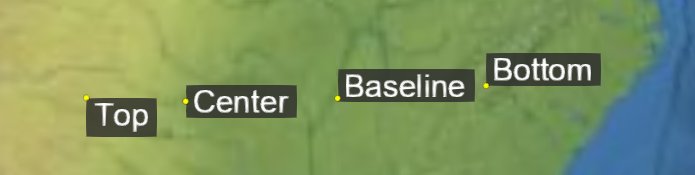
Billboard
or Label. For example, setting the vertical origin to TOP
or BOTTOM will display a billboard above or below (in screen space)
锚的位置.
Properties:
| Name | Type | Description |
|---|---|---|
CENTER |
number | 该起源位于 NT 0 BASELINE NT 1 至 NT 2 TOP NT 3 之间的垂直中心. |
BOTTOM |
number | 来源位于对象底部. |
BASELINE |
number | 如果对象含有文字,则来源于文字的基线,否则来源于对象的底部. |
TOP |
number | 原产地位于物体顶部. |
See:
Properties:
| Name | Type | Description |
|---|---|---|
NONE |
number | 表示一个物体的任何部分都不可见. |
PARTIAL |
number | 代表物体的该部分,但不是全部,可见 |
FULL |
number | 表示一个物体整体可见. |
Properties:
| Name | Type | Description |
|---|---|---|
BOX |
string | 一个盒子形状. |
ELLIPSOID |
string | 椭圆形. |
CYLINDER |
string | 圆柱形. |
Experimental
This feature is not final and is subject to change without Cesium's standard deprecation policy.
Properties:
| Name | Type | Description |
|---|---|---|
DEPTH_BUFFER_BIT |
number | |
STENCIL_BUFFER_BIT |
number | |
COLOR_BUFFER_BIT |
number | |
POINTS |
number | |
LINES |
number | |
LINE_LOOP |
number | |
LINE_STRIP |
number | |
TRIANGLES |
number | |
TRIANGLE_STRIP |
number | |
TRIANGLE_FAN |
number | |
ZERO |
number | |
ONE |
number | |
SRC_COLOR |
number | |
ONE_MINUS_SRC_COLOR |
number | |
SRC_ALPHA |
number | |
ONE_MINUS_SRC_ALPHA |
number | |
DST_ALPHA |
number | |
ONE_MINUS_DST_ALPHA |
number | |
DST_COLOR |
number | |
ONE_MINUS_DST_COLOR |
number | |
SRC_ALPHA_SATURATE |
number | |
FUNC_ADD |
number | |
BLEND_EQUATION |
number | |
BLEND_EQUATION_RGB |
number | |
BLEND_EQUATION_ALPHA |
number | |
FUNC_SUBTRACT |
number | |
FUNC_REVERSE_SUBTRACT |
number | |
BLEND_DST_RGB |
number | |
BLEND_SRC_RGB |
number | |
BLEND_DST_ALPHA |
number | |
BLEND_SRC_ALPHA |
number | |
CONSTANT_COLOR |
number | |
ONE_MINUS_CONSTANT_COLOR |
number | |
CONSTANT_ALPHA |
number | |
ONE_MINUS_CONSTANT_ALPHA |
number | |
BLEND_COLOR |
number | |
ARRAY_BUFFER |
number | |
ELEMENT_ARRAY_BUFFER |
number | |
ARRAY_BUFFER_BINDING |
number | |
ELEMENT_ARRAY_BUFFER_BINDING |
number | |
STREAM_DRAW |
number | |
STATIC_DRAW |
number | |
DYNAMIC_DRAW |
number | |
BUFFER_SIZE |
number | |
BUFFER_USAGE |
number | |
CURRENT_VERTEX_ATTRIB |
number | |
FRONT |
number | |
BACK |
number | |
FRONT_AND_BACK |
number | |
CULL_FACE |
number | |
BLEND |
number | |
DITHER |
number | |
STENCIL_TEST |
number | |
DEPTH_TEST |
number | |
SCISSOR_TEST |
number | |
POLYGON_OFFSET_FILL |
number | |
SAMPLE_ALPHA_TO_COVERAGE |
number | |
SAMPLE_COVERAGE |
number | |
NO_ERROR |
number | |
INVALID_ENUM |
number | |
INVALID_VALUE |
number | |
INVALID_OPERATION |
number | |
OUT_OF_MEMORY |
number | |
CW |
number | |
CCW |
number | |
LINE_WIDTH |
number | |
ALIASED_POINT_SIZE_RANGE |
number | |
ALIASED_LINE_WIDTH_RANGE |
number | |
CULL_FACE_MODE |
number | |
FRONT_FACE |
number | |
DEPTH_RANGE |
number | |
DEPTH_WRITEMASK |
number | |
DEPTH_CLEAR_VALUE |
number | |
DEPTH_FUNC |
number | |
STENCIL_CLEAR_VALUE |
number | |
STENCIL_FUNC |
number | |
STENCIL_FAIL |
number | |
STENCIL_PASS_DEPTH_FAIL |
number | |
STENCIL_PASS_DEPTH_PASS |
number | |
STENCIL_REF |
number | |
STENCIL_VALUE_MASK |
number | |
STENCIL_WRITEMASK |
number | |
STENCIL_BACK_FUNC |
number | |
STENCIL_BACK_FAIL |
number | |
STENCIL_BACK_PASS_DEPTH_FAIL |
number | |
STENCIL_BACK_PASS_DEPTH_PASS |
number | |
STENCIL_BACK_REF |
number | |
STENCIL_BACK_VALUE_MASK |
number | |
STENCIL_BACK_WRITEMASK |
number | |
VIEWPORT |
number | |
SCISSOR_BOX |
number | |
COLOR_CLEAR_VALUE |
number | |
COLOR_WRITEMASK |
number | |
UNPACK_ALIGNMENT |
number | |
PACK_ALIGNMENT |
number | |
MAX_TEXTURE_SIZE |
number | |
MAX_VIEWPORT_DIMS |
number | |
SUBPIXEL_BITS |
number | |
RED_BITS |
number | |
GREEN_BITS |
number | |
BLUE_BITS |
number | |
ALPHA_BITS |
number | |
DEPTH_BITS |
number | |
STENCIL_BITS |
number | |
POLYGON_OFFSET_UNITS |
number | |
POLYGON_OFFSET_FACTOR |
number | |
TEXTURE_BINDING_2D |
number | |
SAMPLE_BUFFERS |
number | |
SAMPLES |
number | |
SAMPLE_COVERAGE_VALUE |
number | |
SAMPLE_COVERAGE_INVERT |
number | |
COMPRESSED_TEXTURE_FORMATS |
number | |
DONT_CARE |
number | |
FASTEST |
number | |
NICEST |
number | |
GENERATE_MIPMAP_HINT |
number | |
BYTE |
number | |
UNSIGNED_BYTE |
number | |
SHORT |
number | |
UNSIGNED_SHORT |
number | |
INT |
number | |
UNSIGNED_INT |
number | |
FLOAT |
number | |
DEPTH_COMPONENT |
number | |
ALPHA |
number | |
RGB |
number | |
RGBA |
number | |
LUMINANCE |
number | |
LUMINANCE_ALPHA |
number | |
UNSIGNED_SHORT_4_4_4_4 |
number | |
UNSIGNED_SHORT_5_5_5_1 |
number | |
UNSIGNED_SHORT_5_6_5 |
number | |
FRAGMENT_SHADER |
number | |
VERTEX_SHADER |
number | |
MAX_VERTEX_ATTRIBS |
number | |
MAX_VERTEX_UNIFORM_VECTORS |
number | |
MAX_VARYING_VECTORS |
number | |
MAX_COMBINED_TEXTURE_IMAGE_UNITS |
number | |
MAX_VERTEX_TEXTURE_IMAGE_UNITS |
number | |
MAX_TEXTURE_IMAGE_UNITS |
number | |
MAX_FRAGMENT_UNIFORM_VECTORS |
number | |
SHADER_TYPE |
number | |
DELETE_STATUS |
number | |
LINK_STATUS |
number | |
VALIDATE_STATUS |
number | |
ATTACHED_SHADERS |
number | |
ACTIVE_UNIFORMS |
number | |
ACTIVE_ATTRIBUTES |
number | |
SHADING_LANGUAGE_VERSION |
number | |
CURRENT_PROGRAM |
number | |
NEVER |
number | |
LESS |
number | |
EQUAL |
number | |
LEQUAL |
number | |
GREATER |
number | |
NOTEQUAL |
number | |
GEQUAL |
number | |
ALWAYS |
number | |
KEEP |
number | |
REPLACE |
number | |
INCR |
number | |
DECR |
number | |
INVERT |
number | |
INCR_WRAP |
number | |
DECR_WRAP |
number | |
VENDOR |
number | |
RENDERER |
number | |
VERSION |
number | |
NEAREST |
number | |
LINEAR |
number | |
NEAREST_MIPMAP_NEAREST |
number | |
LINEAR_MIPMAP_NEAREST |
number | |
NEAREST_MIPMAP_LINEAR |
number | |
LINEAR_MIPMAP_LINEAR |
number | |
TEXTURE_MAG_FILTER |
number | |
TEXTURE_MIN_FILTER |
number | |
TEXTURE_WRAP_S |
number | |
TEXTURE_WRAP_T |
number | |
TEXTURE_2D |
number | |
TEXTURE |
number | |
TEXTURE_CUBE_MAP |
number | |
TEXTURE_BINDING_CUBE_MAP |
number | |
TEXTURE_CUBE_MAP_POSITIVE_X |
number | |
TEXTURE_CUBE_MAP_NEGATIVE_X |
number | |
TEXTURE_CUBE_MAP_POSITIVE_Y |
number | |
TEXTURE_CUBE_MAP_NEGATIVE_Y |
number | |
TEXTURE_CUBE_MAP_POSITIVE_Z |
number | |
TEXTURE_CUBE_MAP_NEGATIVE_Z |
number | |
MAX_CUBE_MAP_TEXTURE_SIZE |
number | |
TEXTURE0 |
number | |
TEXTURE1 |
number | |
TEXTURE2 |
number | |
TEXTURE3 |
number | |
TEXTURE4 |
number | |
TEXTURE5 |
number | |
TEXTURE6 |
number | |
TEXTURE7 |
number | |
TEXTURE8 |
number | |
TEXTURE9 |
number | |
TEXTURE10 |
number | |
TEXTURE11 |
number | |
TEXTURE12 |
number | |
TEXTURE13 |
number | |
TEXTURE14 |
number | |
TEXTURE15 |
number | |
TEXTURE16 |
number | |
TEXTURE17 |
number | |
TEXTURE18 |
number | |
TEXTURE19 |
number | |
TEXTURE20 |
number | |
TEXTURE21 |
number | |
TEXTURE22 |
number | |
TEXTURE23 |
number | |
TEXTURE24 |
number | |
TEXTURE25 |
number | |
TEXTURE26 |
number | |
TEXTURE27 |
number | |
TEXTURE28 |
number | |
TEXTURE29 |
number | |
TEXTURE30 |
number | |
TEXTURE31 |
number | |
ACTIVE_TEXTURE |
number | |
REPEAT |
number | |
CLAMP_TO_EDGE |
number | |
MIRRORED_REPEAT |
number | |
FLOAT_VEC2 |
number | |
FLOAT_VEC3 |
number | |
FLOAT_VEC4 |
number | |
INT_VEC2 |
number | |
INT_VEC3 |
number | |
INT_VEC4 |
number | |
BOOL |
number | |
BOOL_VEC2 |
number | |
BOOL_VEC3 |
number | |
BOOL_VEC4 |
number | |
FLOAT_MAT2 |
number | |
FLOAT_MAT3 |
number | |
FLOAT_MAT4 |
number | |
SAMPLER_2D |
number | |
SAMPLER_CUBE |
number | |
VERTEX_ATTRIB_ARRAY_ENABLED |
number | |
VERTEX_ATTRIB_ARRAY_SIZE |
number | |
VERTEX_ATTRIB_ARRAY_STRIDE |
number | |
VERTEX_ATTRIB_ARRAY_TYPE |
number | |
VERTEX_ATTRIB_ARRAY_NORMALIZED |
number | |
VERTEX_ATTRIB_ARRAY_POINTER |
number | |
VERTEX_ATTRIB_ARRAY_BUFFER_BINDING |
number | |
IMPLEMENTATION_COLOR_READ_TYPE |
number | |
IMPLEMENTATION_COLOR_READ_FORMAT |
number | |
COMPILE_STATUS |
number | |
LOW_FLOAT |
number | |
MEDIUM_FLOAT |
number | |
HIGH_FLOAT |
number | |
LOW_INT |
number | |
MEDIUM_INT |
number | |
HIGH_INT |
number | |
FRAMEBUFFER |
number | |
RENDERBUFFER |
number | |
RGBA4 |
number | |
RGB5_A1 |
number | |
RGB565 |
number | |
DEPTH_COMPONENT16 |
number | |
STENCIL_INDEX |
number | |
STENCIL_INDEX8 |
number | |
DEPTH_STENCIL |
number | |
RENDERBUFFER_WIDTH |
number | |
RENDERBUFFER_HEIGHT |
number | |
RENDERBUFFER_INTERNAL_FORMAT |
number | |
RENDERBUFFER_RED_SIZE |
number | |
RENDERBUFFER_GREEN_SIZE |
number | |
RENDERBUFFER_BLUE_SIZE |
number | |
RENDERBUFFER_ALPHA_SIZE |
number | |
RENDERBUFFER_DEPTH_SIZE |
number | |
RENDERBUFFER_STENCIL_SIZE |
number | |
FRAMEBUFFER_ATTACHMENT_OBJECT_TYPE |
number | |
FRAMEBUFFER_ATTACHMENT_OBJECT_NAME |
number | |
FRAMEBUFFER_ATTACHMENT_TEXTURE_LEVEL |
number | |
FRAMEBUFFER_ATTACHMENT_TEXTURE_CUBE_MAP_FACE |
number | |
COLOR_ATTACHMENT0 |
number | |
DEPTH_ATTACHMENT |
number | |
STENCIL_ATTACHMENT |
number | |
DEPTH_STENCIL_ATTACHMENT |
number | |
NONE |
number | |
FRAMEBUFFER_COMPLETE |
number | |
FRAMEBUFFER_INCOMPLETE_ATTACHMENT |
number | |
FRAMEBUFFER_INCOMPLETE_MISSING_ATTACHMENT |
number | |
FRAMEBUFFER_INCOMPLETE_DIMENSIONS |
number | |
FRAMEBUFFER_UNSUPPORTED |
number | |
FRAMEBUFFER_BINDING |
number | |
RENDERBUFFER_BINDING |
number | |
MAX_RENDERBUFFER_SIZE |
number | |
INVALID_FRAMEBUFFER_OPERATION |
number | |
UNPACK_FLIP_Y_WEBGL |
number | |
UNPACK_PREMULTIPLY_ALPHA_WEBGL |
number | |
CONTEXT_LOST_WEBGL |
number | |
UNPACK_COLORSPACE_CONVERSION_WEBGL |
number | |
BROWSER_DEFAULT_WEBGL |
number | |
COMPRESSED_RGB_S3TC_DXT1_EXT |
number | |
COMPRESSED_RGBA_S3TC_DXT1_EXT |
number | |
COMPRESSED_RGBA_S3TC_DXT3_EXT |
number | |
COMPRESSED_RGBA_S3TC_DXT5_EXT |
number | |
COMPRESSED_RGB_PVRTC_4BPPV1_IMG |
number | |
COMPRESSED_RGB_PVRTC_2BPPV1_IMG |
number | |
COMPRESSED_RGBA_PVRTC_4BPPV1_IMG |
number | |
COMPRESSED_RGBA_PVRTC_2BPPV1_IMG |
number | |
COMPRESSED_RGBA_ASTC_4x4_WEBGL |
number | |
COMPRESSED_RGB_ETC1_WEBGL |
number | |
COMPRESSED_RGBA_BPTC_UNORM |
number | |
HALF_FLOAT_OES |
number | |
DOUBLE |
number | |
READ_BUFFER |
number | |
UNPACK_ROW_LENGTH |
number | |
UNPACK_SKIP_ROWS |
number | |
UNPACK_SKIP_PIXELS |
number | |
PACK_ROW_LENGTH |
number | |
PACK_SKIP_ROWS |
number | |
PACK_SKIP_PIXELS |
number | |
COLOR |
number | |
DEPTH |
number | |
STENCIL |
number | |
RED |
number | |
RGB8 |
number | |
RGBA8 |
number | |
RGB10_A2 |
number | |
TEXTURE_BINDING_3D |
number | |
UNPACK_SKIP_IMAGES |
number | |
UNPACK_IMAGE_HEIGHT |
number | |
TEXTURE_3D |
number | |
TEXTURE_WRAP_R |
number | |
MAX_3D_TEXTURE_SIZE |
number | |
UNSIGNED_INT_2_10_10_10_REV |
number | |
MAX_ELEMENTS_VERTICES |
number | |
MAX_ELEMENTS_INDICES |
number | |
TEXTURE_MIN_LOD |
number | |
TEXTURE_MAX_LOD |
number | |
TEXTURE_BASE_LEVEL |
number | |
TEXTURE_MAX_LEVEL |
number | |
MIN |
number | |
MAX |
number | |
DEPTH_COMPONENT24 |
number | |
MAX_TEXTURE_LOD_BIAS |
number | |
TEXTURE_COMPARE_MODE |
number | |
TEXTURE_COMPARE_FUNC |
number | |
CURRENT_QUERY |
number | |
QUERY_RESULT |
number | |
QUERY_RESULT_AVAILABLE |
number | |
STREAM_READ |
number | |
STREAM_COPY |
number | |
STATIC_READ |
number | |
STATIC_COPY |
number | |
DYNAMIC_READ |
number | |
DYNAMIC_COPY |
number | |
MAX_DRAW_BUFFERS |
number | |
DRAW_BUFFER0 |
number | |
DRAW_BUFFER1 |
number | |
DRAW_BUFFER2 |
number | |
DRAW_BUFFER3 |
number | |
DRAW_BUFFER4 |
number | |
DRAW_BUFFER5 |
number | |
DRAW_BUFFER6 |
number | |
DRAW_BUFFER7 |
number | |
DRAW_BUFFER8 |
number | |
DRAW_BUFFER9 |
number | |
DRAW_BUFFER10 |
number | |
DRAW_BUFFER11 |
number | |
DRAW_BUFFER12 |
number | |
DRAW_BUFFER13 |
number | |
DRAW_BUFFER14 |
number | |
DRAW_BUFFER15 |
number | |
MAX_FRAGMENT_UNIFORM_COMPONENTS |
number | |
MAX_VERTEX_UNIFORM_COMPONENTS |
number | |
SAMPLER_3D |
number | |
SAMPLER_2D_SHADOW |
number | |
FRAGMENT_SHADER_DERIVATIVE_HINT |
number | |
PIXEL_PACK_BUFFER |
number | |
PIXEL_UNPACK_BUFFER |
number | |
PIXEL_PACK_BUFFER_BINDING |
number | |
PIXEL_UNPACK_BUFFER_BINDING |
number | |
FLOAT_MAT2x3 |
number | |
FLOAT_MAT2x4 |
number | |
FLOAT_MAT3x2 |
number | |
FLOAT_MAT3x4 |
number | |
FLOAT_MAT4x2 |
number | |
FLOAT_MAT4x3 |
number | |
SRGB |
number | |
SRGB8 |
number | |
SRGB8_ALPHA8 |
number | |
COMPARE_REF_TO_TEXTURE |
number | |
RGBA32F |
number | |
RGB32F |
number | |
RGBA16F |
number | |
RGB16F |
number | |
VERTEX_ATTRIB_ARRAY_INTEGER |
number | |
MAX_ARRAY_TEXTURE_LAYERS |
number | |
MIN_PROGRAM_TEXEL_OFFSET |
number | |
MAX_PROGRAM_TEXEL_OFFSET |
number | |
MAX_VARYING_COMPONENTS |
number | |
TEXTURE_2D_ARRAY |
number | |
TEXTURE_BINDING_2D_ARRAY |
number | |
R11F_G11F_B10F |
number | |
UNSIGNED_INT_10F_11F_11F_REV |
number | |
RGB9_E5 |
number | |
UNSIGNED_INT_5_9_9_9_REV |
number | |
TRANSFORM_FEEDBACK_BUFFER_MODE |
number | |
MAX_TRANSFORM_FEEDBACK_SEPARATE_COMPONENTS |
number | |
TRANSFORM_FEEDBACK_VARYINGS |
number | |
TRANSFORM_FEEDBACK_BUFFER_START |
number | |
TRANSFORM_FEEDBACK_BUFFER_SIZE |
number | |
TRANSFORM_FEEDBACK_PRIMITIVES_WRITTEN |
number | |
RASTERIZER_DISCARD |
number | |
MAX_TRANSFORM_FEEDBACK_INTERLEAVED_COMPONENTS |
number | |
MAX_TRANSFORM_FEEDBACK_SEPARATE_ATTRIBS |
number | |
INTERLEAVED_ATTRIBS |
number | |
SEPARATE_ATTRIBS |
number | |
TRANSFORM_FEEDBACK_BUFFER |
number | |
TRANSFORM_FEEDBACK_BUFFER_BINDING |
number | |
RGBA32UI |
number | |
RGB32UI |
number | |
RGBA16UI |
number | |
RGB16UI |
number | |
RGBA8UI |
number | |
RGB8UI |
number | |
RGBA32I |
number | |
RGB32I |
number | |
RGBA16I |
number | |
RGB16I |
number | |
RGBA8I |
number | |
RGB8I |
number | |
RED_INTEGER |
number | |
RGB_INTEGER |
number | |
RGBA_INTEGER |
number | |
SAMPLER_2D_ARRAY |
number | |
SAMPLER_2D_ARRAY_SHADOW |
number | |
SAMPLER_CUBE_SHADOW |
number | |
UNSIGNED_INT_VEC2 |
number | |
UNSIGNED_INT_VEC3 |
number | |
UNSIGNED_INT_VEC4 |
number | |
INT_SAMPLER_2D |
number | |
INT_SAMPLER_3D |
number | |
INT_SAMPLER_CUBE |
number | |
INT_SAMPLER_2D_ARRAY |
number | |
UNSIGNED_INT_SAMPLER_2D |
number | |
UNSIGNED_INT_SAMPLER_3D |
number | |
UNSIGNED_INT_SAMPLER_CUBE |
number | |
UNSIGNED_INT_SAMPLER_2D_ARRAY |
number | |
DEPTH_COMPONENT32F |
number | |
DEPTH32F_STENCIL8 |
number | |
FLOAT_32_UNSIGNED_INT_24_8_REV |
number | |
FRAMEBUFFER_ATTACHMENT_COLOR_ENCODING |
number | |
FRAMEBUFFER_ATTACHMENT_COMPONENT_TYPE |
number | |
FRAMEBUFFER_ATTACHMENT_RED_SIZE |
number | |
FRAMEBUFFER_ATTACHMENT_GREEN_SIZE |
number | |
FRAMEBUFFER_ATTACHMENT_BLUE_SIZE |
number | |
FRAMEBUFFER_ATTACHMENT_ALPHA_SIZE |
number | |
FRAMEBUFFER_ATTACHMENT_DEPTH_SIZE |
number | |
FRAMEBUFFER_ATTACHMENT_STENCIL_SIZE |
number | |
FRAMEBUFFER_DEFAULT |
number | |
UNSIGNED_INT_24_8 |
number | |
DEPTH24_STENCIL8 |
number | |
UNSIGNED_NORMALIZED |
number | |
DRAW_FRAMEBUFFER_BINDING |
number | |
READ_FRAMEBUFFER |
number | |
DRAW_FRAMEBUFFER |
number | |
READ_FRAMEBUFFER_BINDING |
number | |
RENDERBUFFER_SAMPLES |
number | |
FRAMEBUFFER_ATTACHMENT_TEXTURE_LAYER |
number | |
MAX_COLOR_ATTACHMENTS |
number | |
COLOR_ATTACHMENT1 |
number | |
COLOR_ATTACHMENT2 |
number | |
COLOR_ATTACHMENT3 |
number | |
COLOR_ATTACHMENT4 |
number | |
COLOR_ATTACHMENT5 |
number | |
COLOR_ATTACHMENT6 |
number | |
COLOR_ATTACHMENT7 |
number | |
COLOR_ATTACHMENT8 |
number | |
COLOR_ATTACHMENT9 |
number | |
COLOR_ATTACHMENT10 |
number | |
COLOR_ATTACHMENT11 |
number | |
COLOR_ATTACHMENT12 |
number | |
COLOR_ATTACHMENT13 |
number | |
COLOR_ATTACHMENT14 |
number | |
COLOR_ATTACHMENT15 |
number | |
FRAMEBUFFER_INCOMPLETE_MULTISAMPLE |
number | |
MAX_SAMPLES |
number | |
HALF_FLOAT |
number | |
RG |
number | |
RG_INTEGER |
number | |
R8 |
number | |
RG8 |
number | |
R16F |
number | |
R32F |
number | |
RG16F |
number | |
RG32F |
number | |
R8I |
number | |
R8UI |
number | |
R16I |
number | |
R16UI |
number | |
R32I |
number | |
R32UI |
number | |
RG8I |
number | |
RG8UI |
number | |
RG16I |
number | |
RG16UI |
number | |
RG32I |
number | |
RG32UI |
number | |
VERTEX_ARRAY_BINDING |
number | |
R8_SNORM |
number | |
RG8_SNORM |
number | |
RGB8_SNORM |
number | |
RGBA8_SNORM |
number | |
SIGNED_NORMALIZED |
number | |
COPY_READ_BUFFER |
number | |
COPY_WRITE_BUFFER |
number | |
COPY_READ_BUFFER_BINDING |
number | |
COPY_WRITE_BUFFER_BINDING |
number | |
UNIFORM_BUFFER |
number | |
UNIFORM_BUFFER_BINDING |
number | |
UNIFORM_BUFFER_START |
number | |
UNIFORM_BUFFER_SIZE |
number | |
MAX_VERTEX_UNIFORM_BLOCKS |
number | |
MAX_FRAGMENT_UNIFORM_BLOCKS |
number | |
MAX_COMBINED_UNIFORM_BLOCKS |
number | |
MAX_UNIFORM_BUFFER_BINDINGS |
number | |
MAX_UNIFORM_BLOCK_SIZE |
number | |
MAX_COMBINED_VERTEX_UNIFORM_COMPONENTS |
number | |
MAX_COMBINED_FRAGMENT_UNIFORM_COMPONENTS |
number | |
UNIFORM_BUFFER_OFFSET_ALIGNMENT |
number | |
ACTIVE_UNIFORM_BLOCKS |
number | |
UNIFORM_TYPE |
number | |
UNIFORM_SIZE |
number | |
UNIFORM_BLOCK_INDEX |
number | |
UNIFORM_OFFSET |
number | |
UNIFORM_ARRAY_STRIDE |
number | |
UNIFORM_MATRIX_STRIDE |
number | |
UNIFORM_IS_ROW_MAJOR |
number | |
UNIFORM_BLOCK_BINDING |
number | |
UNIFORM_BLOCK_DATA_SIZE |
number | |
UNIFORM_BLOCK_ACTIVE_UNIFORMS |
number | |
UNIFORM_BLOCK_ACTIVE_UNIFORM_INDICES |
number | |
UNIFORM_BLOCK_REFERENCED_BY_VERTEX_SHADER |
number | |
UNIFORM_BLOCK_REFERENCED_BY_FRAGMENT_SHADER |
number | |
INVALID_INDEX |
number | |
MAX_VERTEX_OUTPUT_COMPONENTS |
number | |
MAX_FRAGMENT_INPUT_COMPONENTS |
number | |
MAX_SERVER_WAIT_TIMEOUT |
number | |
OBJECT_TYPE |
number | |
SYNC_CONDITION |
number | |
SYNC_STATUS |
number | |
SYNC_FLAGS |
number | |
SYNC_FENCE |
number | |
SYNC_GPU_COMMANDS_COMPLETE |
number | |
UNSIGNALED |
number | |
SIGNALED |
number | |
ALREADY_SIGNALED |
number | |
TIMEOUT_EXPIRED |
number | |
CONDITION_SATISFIED |
number | |
WAIT_FAILED |
number | |
SYNC_FLUSH_COMMANDS_BIT |
number | |
VERTEX_ATTRIB_ARRAY_DIVISOR |
number | |
ANY_SAMPLES_PASSED |
number | |
ANY_SAMPLES_PASSED_CONSERVATIVE |
number | |
SAMPLER_BINDING |
number | |
RGB10_A2UI |
number | |
INT_2_10_10_10_REV |
number | |
TRANSFORM_FEEDBACK |
number | |
TRANSFORM_FEEDBACK_PAUSED |
number | |
TRANSFORM_FEEDBACK_ACTIVE |
number | |
TRANSFORM_FEEDBACK_BINDING |
number | |
COMPRESSED_R11_EAC |
number | |
COMPRESSED_SIGNED_R11_EAC |
number | |
COMPRESSED_RG11_EAC |
number | |
COMPRESSED_SIGNED_RG11_EAC |
number | |
COMPRESSED_RGB8_ETC2 |
number | |
COMPRESSED_SRGB8_ETC2 |
number | |
COMPRESSED_RGB8_PUNCHTHROUGH_ALPHA1_ETC2 |
number | |
COMPRESSED_SRGB8_PUNCHTHROUGH_ALPHA1_ETC2 |
number | |
COMPRESSED_RGBA8_ETC2_EAC |
number | |
COMPRESSED_SRGB8_ALPHA8_ETC2_EAC |
number | |
TEXTURE_IMMUTABLE_FORMAT |
number | |
MAX_ELEMENT_INDEX |
number | |
TEXTURE_IMMUTABLE_LEVELS |
number | |
MAX_TEXTURE_MAX_ANISOTROPY_EXT |
number |
Properties:
| Name | Type | Description |
|---|---|---|
CLOCKWISE |
number | 温度是顺时针顺序的. |
COUNTER_CLOCKWISE |
number | Vertices是逆时针顺序. |
Methods
addDrillPickedResults(pickedResults, limit, results, pickedPrimitives, pickedAttributes, pickedFeatures) → boolean
| Name | Type | Description |
|---|---|---|
pickedResults |
Array.<object> | 调用结果 |
limit |
number | 如果供应,在收集了这么多采样后,停止钻探. |
results |
Array.<object> | |
pickedPrimitives |
Array.<object> | |
pickedAttributes |
Array.<object> | |
pickedFeatures |
Array.<object> |
Returns:
barycentricCoordinates(point, p0, p1, p2, result) → Cartesian3|undefined
| Name | Type | Description |
|---|---|---|
point |
Cartesian2 | Cartesian3 | 试问之分. |
p0 |
Cartesian2 | Cartesian3 | 三角形的第一点,对应巴音中心x轴. |
p1 |
Cartesian2 | Cartesian3 | 三角形的第二点,对应巴向心Y轴. |
p2 |
Cartesian2 | Cartesian3 | 三角形的第三点,对应巴以心的z轴. |
result |
Cartesian3 | optional 存储结果的对象 . |
Returns:
Example:
// Returns Cartesian3.UNIT_X
const p = new Cesium.Cartesian3(-1.0, 0.0, 0.0);
const b = Cesium.barycentricCoordinates(p,
  new Cesium.Cartesian3(-1.0, 0.0, 0.0),
  new Cesium.Cartesian3( 1.0, 0.0, 0.0),
new Cesium.Cartesian3( 0.0, 1.0, 1.0));| Name | Type | Description |
|---|---|---|
array |
Array | Int8Array | Uint8Array | Int16Array | Uint16Array | Int32Array | Uint32Array | Float32Array | Float64Array | 要搜索的排序数组 . |
itemToFind |
* | 在数组中查找的项目 . |
comparator |
binarySearchComparator | 用于比较项目和 矩阵中的元素. |
Returns:
itemToFind in the array, if it exists. If itemToFind
does not exist, the return value is a negative number which is the bitwise complement (~)
索引中插入项目 ToFind,以保持
排列数组的顺序.
Example:
// Create a comparator function to search through an array of numbers.
function comparator(a, b) {
    return a - b;
};
const numbers = [0, 2, 4, 6, 8];
const index = Cesium.binarySearch(numbers, 6, comparator); // 3| Name | Type | Description |
|---|---|---|
relativeUrl |
string | 相对之道. |
Returns:
Example:
const viewer = new Cesium.Viewer("cesiumContainer", {
  baseLayer: Cesium.ImageryLayer.fromProviderAsync(
    Cesium.TileMapServiceImageryProvider.fromUrl(
      Cesium.buildModuleUrl("Assets/Textures/NaturalEarthII"),
    )),
  baseLayerPicker: false,
});| Name | Type | Default | Description |
|---|---|---|---|
object |
object | 克隆对象 . | |
deep |
boolean |
false
|
optional If true, all properties will be deep cloned recursively. |
Returns:
| Name | Type | Default | Description |
|---|---|---|---|
object1 |
object | optional The first object to merge. | |
object2 |
object | optional The second object to merge. | |
deep |
boolean |
false
|
optional Perform a recursive merge. |
Returns:
Example:
const object1 = {
    propOne : 1,
    propTwo : {
        value1 : 10
    }
}
const object2 = {
    propTwo : 2
}
const final = Cesium.combine(object1, object2);

// final === {
//     propOne : 1,
//     propTwo : {
//         value1 : 10
//     }
// }computePickingDrawingBufferRectangle(drawingBufferHeight, position, width, height, result) → BoundingRectangle
| Name | Type | Description |
|---|---|---|
drawingBufferHeight |
number | 绘图缓冲器的高度 |
position |
Cartesian2 | 绘图缓冲器内的位置 |
width |
number | undefined | 长方形的宽度,假定为 是一个奇数整数, 默认数 : 3. 0 |
height |
number | undefined | 长方形的高度. 如果未说明, 高度将默认为 NT 0 width NT 1 |
result |
BoundingRectangle | 结果矩形 |
Returns:
copyArrayCartesian3(input) → Array.<Cartesian3>|undefined
Cartesian3.clone.
| Name | Type | Description |
|---|---|---|
input |
Array.<Cartesian3> | undefined | 输入数组 |
Returns:
createAABBForNode(x, y, level) → AxisAlignedBoundingBox
| Name | Type | Description |
|---|---|---|
x |
number | 节点的x坐标. |
y |
number | 节点的y坐标. |
level |
number | 节点的级别. |
Returns:
createAnchorPointDirect(anchorPointDirectJson) → AnchorPointDirect
| Name | Type | Description |
|---|---|---|
anchorPointDirectJson |
object | 输入 NT 0 |
Returns:
createAnchorPointIndirect(anchorPointIndirectJson) → AnchorPointIndirect
| Name | Type | Description |
|---|---|---|
anchorPointIndirectJson |
object | 输入 NT 0 |
Returns:
| Name | Type | Default | Description |
|---|---|---|---|
func |
function | 要执行的功能 . | |
canExecute |
boolean |
true
|
optional A boolean indicating whether the function can currently be executed. |
createCorrelationGroup(correlationGroupJson) → CorrelationGroup
| Name | Type | Description |
|---|---|---|
correlationGroupJson |
object | 输入 NT 0 |
Returns:
createCovarianceMatrixFromUpperTriangle(array) → Matrix3
| Name | Type | Description |
|---|---|---|
array |
Array.<number> | 输入数组 |
Returns:
createElevationBandMaterial(options) → Material
Material that combines multiple layers of color/gradient bands and maps them to terrain heights.
阴影器对所有高地进行二进制搜索,以找出在某一高地之上和以下的颜色
在它们之间插入最后的颜色。 这些材料以相对便宜的方式支持了数百个条目.
| Name | Type | Description | |||||||||
|---|---|---|---|---|---|---|---|---|---|---|---|
options |
object |
下列属性的对象 :
|
Returns:
Material instance.
Example:
scene.globe.material = Cesium.createElevationBandMaterial({
    scene : scene,
    layers : [{
        entries : [{
            height : 4200.0,
            color : new Cesium.Color(0.0, 0.0, 0.0, 1.0)
        }, {
            height : 8848.0,
            color : new Cesium.Color(1.0, 1.0, 1.0, 1.0)
        }],
        extendDownwards : true,
        extendUpwards : true,
    }, {
        entries : [{
            height : 7000.0,
            color : new Cesium.Color(1.0, 0.0, 0.0, 0.5)
        }, {
            height : 7100.0,
            color : new Cesium.Color(1.0, 0.0, 0.0, 0.5)
        }]
    }]
});
Demo:
async createGooglePhotorealistic3DTileset(apiOptions, tilesetOptions) → Promise.<Cesium3DTileset>
Cesium3DTileset instance for the Google Photorealistic 3D
Tiles tileset.
Google照片现实主义3D Tiles只能使用Google地理编码器. 改为
确认您知道这个限制出入证
`usingOnlyWithGoogleGeocoder: true` 到 pi 选项 。 否则就一次
警告将在调用此函数时显示.
| Name | Type | Description | ||||||||||||
|---|---|---|---|---|---|---|---|---|---|---|---|---|---|---|
apiOptions |
object |
optional
|
||||||||||||
tilesetOptions |
Cesium3DTileset.ConstructorOptions | optional 一个描述初始化选项的对象 . |
Returns:
Examples:
const viewer = new Cesium.Viewer("cesiumContainer", {
  geocoder: Cesium.IonGeocodeProviderType.GOOGLE
});

try {
  const tileset = await Cesium.createGooglePhotorealistic3DTileset({
     onlyUsingWithGoogleGeocoder: true,
  });
  viewer.scene.primitives.add(tileset));
} catch (error) {
  console.log(`Error creating tileset: ${error}`);
}
// Use your own Google Maps API key
Cesium.GoogleMaps.defaultApiKey = "your-api-key";
const viewer = new Cesium.Viewer("cesiumContainer". {
geocoder: Cesium.IonGeocodeProviderType.GOOGLE
});
try {
const tileset = await Cesium.createGooglePhotorealistic3DTileset({
onlyUsingWithGoogleGeocoder: true,
});
viewer.scene.primitives.add(tileset));
} catch (error) {
console.log(`Error creating tileset: ${error}`);
}See:
Returns:
Example:
this.guid = Cesium.createGuid();See:
async createOsmBuildingsAsync(options) → Promise.<Cesium3DTileset>
Cesium3DTileset instance for the
Cesium OSM Buildings
tileset.
| Name | Type | Description | ||||||||||||||||||||
|---|---|---|---|---|---|---|---|---|---|---|---|---|---|---|---|---|---|---|---|---|---|---|
options |
object |
optional
Construction options. Any options allowed by the Cesium3DTileset constructor
可在此处注明。 除此以外,还支持以下属性:
|
Returns:
Examples:
// Create Cesium OSM Buildings with default styling
const viewer = new Cesium.Viewer("cesiumContainer");
try {
  const tileset = await Cesium.createOsmBuildingsAsync();
  viewer.scene.primitives.add(tileset));
} catch (error) {
  console.log(`Error creating tileset: ${error}`);
}
// Create Cesium OSM Buildings with a custom style highlighting
// schools and hospitals.
const viewer = new Cesium.Viewer("cesiumContainer");
try {
const tileset = await Cesium.createOsmBuildingsAsync({
style: new Cesium.Cesium3DTileStyle({
color: {
conditions: [
["${feature['building']} === 'hospital'", "color('#0000FF')"],
["${feature['building']} === 'school'", "color('#00FF00')"],
[true, "color('#ffffff')"]
]
}
})
});
viewer.scene.primitives.add(tileset));
} catch (error) {
console.log(`Error creating tileset: ${error}`);
}See:
createTangentSpaceDebugPrimitive(options) → Primitive
Primitive to visualize well-known vector vertex attributes:
normal, tangent, and bitangent. Normal
红色; 正切色为绿色; 咬痕色为蓝色。 如果一个属性不是
现在,它没有绘制.
| Name | Type | Description | ||||||||||||||||
|---|---|---|---|---|---|---|---|---|---|---|---|---|---|---|---|---|---|---|
options |
object |
下列属性的对象 :
|
Returns:
Primitive instance with geometry for the vectors.
Example:
scene.primitives.add(Cesium.createTangentSpaceDebugPrimitive({
   geometry : instance.geometry,
   length : 100000.0,
   modelMatrix : instance.modelMatrix
}));createWorldBathymetryAsync(options) → Promise.<CesiumTerrainProvider>
CesiumTerrainProvider instance for the Cesium World Bathymetry.
| Name | Type | Description | ||||||||
|---|---|---|---|---|---|---|---|---|---|---|
options |
object |
optional
下列属性的对象 :
|
Returns:
Examples:
// Create Cesium World Bathymetry with default settings
try {
  const viewer = new Cesium.Viewer("cesiumContainer", {
    terrainProvider: await Cesium.createWorldBathymetryAsync();
  });
} catch (error) {
  console.log(error);
}
// Create Cesium World Bathymetry with normals.
try {
const viewer1 = new Cesium.Viewer("cesiumContainer", {
terrainProvider: await Cesium.createWorldBathymetryAsync({
requestVertexNormals: true
});
});
} catch (error) {
console.log(error);
}See:
createWorldImageryAsync(options) → Promise.<IonImageryProvider>
IonImageryProvider 例,目前为 Bing Maps.
| Name | Type | Description | ||||||||
|---|---|---|---|---|---|---|---|---|---|---|
options |
object |
optional
下列属性的对象 :
|
Returns:
Examples:
// Create a Cesium World Imagery base layer with default settings
try {
  const imageryProvider = await Cesium.createWorldImageryAsync();
} catch (error) {
  console.log(`There was an error creating world imagery: ${error}`);
}
// Create Cesium World Imagery with different style
try {
const imageryProvider = await Cesium.createWorldImageryAsync({
style: Cesium.IonWorldImageryStyle.AERIAL_WITH_LABELS
});
} catch (error) {
console.log(`There was an error creating world imagery: ${error}`);
}See:
createWorldTerrainAsync(options) → Promise.<CesiumTerrainProvider>
CesiumTerrainProvider instance for the Cesium World Terrain.
| Name | Type | Description | ||||||||||||
|---|---|---|---|---|---|---|---|---|---|---|---|---|---|---|
options |
object |
optional
下列属性的对象 :
|
Returns:
Examples:
// Create Cesium World Terrain with default settings
try {
  const viewer = new Cesium.Viewer("cesiumContainer", {
    terrainProvider: await Cesium.createWorldTerrainAsync();
  });
} catch (error) {
  console.log(error);
}
// Create Cesium World Terrain with water and normals.
try {
const viewer1 = new Cesium.Viewer("cesiumContainer", {
terrainProvider: await Cesium.createWorldTerrainAsync({
requestWaterMask: true,
requestVertexNormals: true
});
});
} catch (error) {
console.log(error);
}See:
| Name | Type | Description |
|---|---|---|
value |
* | The object. |
Returns:
Example:
if (Cesium.defined(positions)) {
     doSomething();
} else {
     doSomethingElse();
}DeveloperError, except for the object's
isDestroyed function, which is set to a function that returns true.
该天体的属性用 NT 0 delete NT 1 去除.
This function is used by objects that hold native resources, e.g., WebGL resources, which 需要明确释放。 客户端代码调用对象的 NT 0 destroy NT 1 函数, 然后释放本地资源,并拨打 NT 0 Destroy Object NT 1 让自己站出来 在一个毁灭的状态.
| Name | Type | Description |
|---|---|---|
object |
object | 破坏对象. |
message |
string | optional 如果 已销毁对象的函数称为. |
Example:
// How a texture would destroy itself.
this.destroy = function () {
    _gl.deleteTexture(_texture);
    return Cesium.destroyObject(this);
};
See:
| Name | Type | Default | Description |
|---|---|---|---|
pickCallback |
function | 选择回调以执行每次迭代 | |
limit |
number |
Number.MAX_VALUE
|
optional If supplied, stop drilling after collecting this many picks |
Returns:
| Name | Type | Description |
|---|---|---|
a |
Array.<Cartesian3> | undefined | 第一个阵列 |
b |
Array.<Cartesian3> | undefined | 第二个阵列 |
Returns:
exportKml(options) → Promise.<(exportKmlResultKml|exportKmlResultKmz)>
SampledProperty otherwise we sample the value using
点、 Billboard、 模型和路径等具有时间动态位置的几何将导出
as gx:Track Features. Not all Materials are representable in KML, so for more advanced Materials just the primary
颜色是使用的。 Canvas 对象导出为 NT 0 图像 .
| Name | Type | Description | ||||||||||||||||||||||||||||||||
|---|---|---|---|---|---|---|---|---|---|---|---|---|---|---|---|---|---|---|---|---|---|---|---|---|---|---|---|---|---|---|---|---|---|---|
options |
object |
具有下列属性的天体:
|
Returns:
Example:
Cesium.exportKml({
     entities: entityCollection
 })
  .then(function(result) {
    // The XML string is in result.kml

    const externalFiles = result.externalFiles
    for(const file in externalFiles) {
      // file is the name of the file used in the KML document as the href
      // externalFiles[file] is a blob with the contents of the file
    }
  });
Demo:
| Name | Type | Description |
|---|---|---|
object |
* | 在数组中查找的项目 . |
Returns:
| Name | Type | Description |
|---|---|---|
relative |
string | 相对的尤里. |
base |
string | optional 基地乌里. |
Returns:
Example:
//absolute Uri will be "https://test.com/awesome.png";
const absoluteUri = Cesium.getAbsoluteUri('awesome.png', 'https://test.com');| Name | Type | Default | Description |
|---|---|---|---|
uri |
string | The Uri. | |
includeQuery |
boolean |
虚假
|
optional 是否包含查询字符串和片段构成uri |
Returns:
Example:
// basePath will be "/Gallery/";
const basePath = Cesium.getBaseUri('/Gallery/simple.czml?value=true&example=false');

// basePath will be "/Gallery/?value=true&example=false";
const basePath = Cesium.getBaseUri('/Gallery/simple.czml?value=true&example=false', true);| Name | Type | Description |
|---|---|---|
uri |
string | The Uri. |
Returns:
Example:
//extension will be "czml";
const extension = Cesium.getExtensionFromUri('/Gallery/simple.czml?value=true&example=false');| Name | Type | Description |
|---|---|---|
uri |
string | The Uri. |
Returns:
Example:
//fileName will be"simple.czml";
const fileName = Cesium.getFilenameFromUri('/Gallery/simple.czml?value=true&example=false');| Name | Type | Description |
|---|---|---|
image |
HTMLImageElement | ImageBitmap | 提取像素的图像 . |
width |
number | The width of the image. If not defined, then image.width is assigned. |
height |
number | The height of the image. If not defined, then image.height is assigned. |
Returns:
| Name | Type | Description |
|---|---|---|
classProperty |
MetadataClassProperty | 类财产 |
metadataProperty |
object | 元数据属性,无论是 a `PropertyTextureProperty` or a `PropertyAttributeProperty` |
componentName |
string | 名称,在["x","y","z","w"]中 |
Returns:
| Name | Type | Description |
|---|---|---|
classProperty |
MetadataClassProperty | 类财产 |
metadataProperty |
object | 元数据属性,无论是 a `PropertyTextureProperty` or a `PropertyAttributeProperty` |
Returns:
Returns:
| Name | Type | Description |
|---|---|---|
year |
number | 验之年. |
Returns:
Example:
const leapYear = Cesium.isLeapYear(2000); // true| Name | Type | Description |
|---|---|---|
material |
Material | 装入立方体图像的材料 . |
uniformId |
string | 与立方体图像对应的制服的ID. |
Returns:
| Name | Type | Description |
|---|---|---|
array |
Array | Int8Array | Uint8Array | Int16Array | Uint16Array | Int32Array | Uint32Array | Float32Array | Float64Array | 要排序的阵列 . |
comparator |
mergeSortComparator | 用于比较数组中元素的函数. |
userDefinedObject |
* |
optional
Any item to pass as the third parameter to comparator. |
Example:
// Assume array contains BoundingSpheres in world coordinates.
// Sort them in ascending order of distance from the camera.
const position = camera.positionWC;
Cesium.mergeSort(array, function(a, b, position) {
    return Cesium.BoundingSphere.distanceSquaredTo(b, position) - Cesium.BoundingSphere.distanceSquaredTo(a, position);
}, position);| Name | Type | Description |
|---|---|---|
obj |
object | 包含要编码的数据的对象. |
Returns:
- queryToObject // str will be: // 'key1=some%20value&key2=a%2Fb&key3=x&key3=y'
Example:
const str = Cesium.objectToQuery({
    key1 : 'some value',
    key2 : 'a/b',
    key3 : ['x', 'y']
});
See:
| Name | Type | Description |
|---|---|---|
scene |
Scene | The scene. |
Returns:
| Name | Type | Default | Description |
|---|---|---|---|
scene |
Scene | ||
windowPosition |
Cartesian2 | 要执行的窗口坐标 . | |
drawingBufferRectangle |
BoundingRectangle | 输出绘制缓冲矩 . | |
width |
number |
3
|
optional Width of the pick rectangle. |
height |
number |
3
|
optional Height of the pick rectangle. |
| Name | Type | Description |
|---|---|---|
scene |
Scene |
| Name | Type | Description |
|---|---|---|
pickObjects |
Map.<number, object> | |
key |
number | |
color |
Color |
| Name | Type | Description |
|---|---|---|
point |
Cartesian2 | Cartesian3 | 试问之分. |
p0 |
Cartesian2 | Cartesian3 | 三角形的第一点. |
p1 |
Cartesian2 | Cartesian3 | 三角形的第二点. |
p2 |
Cartesian2 | Cartesian3 | 三角形的第三点. |
Returns:
Example:
// Returns true
const p = new Cesium.Cartesian2(0.25, 0.25);
const b = Cesium.pointInsideTriangle(p,
  new Cesium.Cartesian2(0.0, 0.0),
  new Cesium.Cartesian2(1.0, 0.0),
new Cesium.Cartesian2(0.0, 1.0));| Name | Type | Description |
|---|---|---|
queryString |
string | 查询字符串. |
Returns:
Example:
const obj = Cesium.queryToObject('key1=some%20value&key2=a%2Fb&key3=x&key3=y');
// obj will be:
// {
//   key1 : 'some value',
//   key2 : 'a/b',
//   key3 : ['x', 'y']
// }
See:
| Name | Type | Description |
|---|---|---|
gltf |
object | 一个包含 glTF 资产的 Javascript 对象 . |
extension |
string | 要删除的扩展 . |
Returns:
| Name | Type | Description |
|---|---|---|
parsedContent |
object | 解析的内容 |
sampleTerrain(terrainProvider, level, positions, rejectOnTileFail) → Promise.<Array.<Cartographic>>
Cartographic positions by
向地形提供者索取瓷砖、取样和插图。 内插
匹配用于渲染指定级别地形的三角形。 查询
同步发生, 因此此函数返回一个在
查询完成。 每点高度都会被修改到位. 如果一个高度不能是
确定,因为没有该地点特定级别的地形数据,
或发生其他错误,高度设定为未定义。 正如典型的
Cartographic type, the supplied height is a height above the reference ellipsoid
(such as Ellipsoid.WGS84) rather than an altitude above mean sea level. In other
如果在海洋中取样的话,则不一定是0.0。 此函数需要
地形详细度作为输入,如果需要精确地获得地形高度
尽可能地(以最大详细度表示)使用 sampleTerrainMostDetailed .
| Name | Type | Default | Description |
|---|---|---|---|
terrainProvider |
TerrainProvider | 用于查询高度的地形提供者 . | |
level |
number | 详细地形等级,用以查询地形高度. | |
positions |
Array.<Cartographic> | 以地形高度更新的位置. | |
rejectOnTileFail |
boolean |
false
|
optional If true, for any failed terrain tile requests, the promise will be rejected. If false, returned heights will be undefined. |
Returns:
Example:
// Query the terrain height of two Cartographic positions
const terrainProvider = await Cesium.createWorldTerrainAsync();
const positions = [
    Cesium.Cartographic.fromDegrees(86.925145, 27.988257),
    Cesium.Cartographic.fromDegrees(87.0, 28.0)
];
const updatedPositions = await Cesium.sampleTerrain(terrainProvider, 11, positions);
// positions[0].height and positions[1].height have been updated.
// updatedPositions is just a reference to positions.

// To handle tile errors, pass true for the rejectOnTileFail parameter.
try {
   const updatedPositions = await Cesium.sampleTerrain(terrainProvider, 11, positions, true);
} catch (error) {
  // A tile request error occurred.
}
See:
sampleTerrainMostDetailed(terrainProvider, positions, rejectOnTileFail) → Promise.<Array.<Cartographic>>
| Name | Type | Default | Description |
|---|---|---|---|
terrainProvider |
TerrainProvider | 用于查询高度的地形提供者 . | |
positions |
Array.<Cartographic> | 以地形高度更新的位置. | |
rejectOnTileFail |
boolean |
false
|
optional If true, for a failed terrain tile request the promise will be rejected. If false, returned heights will be undefined. |
Returns:
Example:
// Query the terrain height of two Cartographic positions
const terrainProvider = await Cesium.createWorldTerrainAsync();
const positions = [
    Cesium.Cartographic.fromDegrees(86.925145, 27.988257),
    Cesium.Cartographic.fromDegrees(87.0, 28.0)
];
const updatedPositions = await Cesium.sampleTerrainMostDetailed(terrainProvider, positions);
// positions[0].height and positions[1].height have been updated.
// updatedPositions is just a reference to positions.

// To handle tile errors, pass true for the rejectOnTileFail parameter.
try {
   const updatedPositions = await Cesium.sampleTerrainMostDetailed(terrainProvider, positions, true);
} catch (error) {
  // A tile request error occurred.
}| Name | Type | Description |
|---|---|---|
value |
number | SRGB 色彩空间中的颜色值 . |
Returns:
Example:
const srgbColor = [0.5, 0.5, 0.5];
const linearColor = srgbColor.map(function (c) {
    return Cesium.srgbToLinear(c);
});| Name | Type | Description |
|---|---|---|
position |
Cartesian2 | optional 仪表座标. |
tangentPlane |
EllipseGeometry | optional 投射到的正切平面. |
| Name | Type | Description |
|---|---|---|
array |
Array | 要分割的阵列 . |
numberOfArrays |
number | 将提供的数组拆分成数组的数量 . |
Throws:
-
DeveloperError : numberOfArrays must be greater than 0.
| Name | Type | Description |
|---|---|---|
input |
string | 输入值 |
offset |
string | The offset |
scale |
string | The scale |
Returns:
| Name | Type | Description |
|---|---|---|
input |
string | 输入值 |
componentType |
string | 组件类型 |
Returns:
Cesium3DTilesInspector widget to the Viewer widget.
此函数通常作为
a 参数为 Viewer#extend ,如下例所示.
| Name | Type | Description |
|---|---|---|
viewer |
Viewer | 观者例. |
Example:
const viewer = new Cesium.Viewer('cesiumContainer');
viewer.extend(Cesium.viewerCesium3DTilesInspectorMixin);Viewer#extend ,如下例所示.
| Name | Type | Description |
|---|---|---|
viewer |
Viewer | 观者例. |
Throws:
-
DeveloperError : viewer is required.
Example:
const viewer = new Cesium.Viewer('cesiumContainer');
viewer.extend(Cesium.viewerCesiumInspectorMixin);
Demo:
Viewer#extend ,如下例所示.
| Name | Type | Description | ||||||||||||||||||||||||
|---|---|---|---|---|---|---|---|---|---|---|---|---|---|---|---|---|---|---|---|---|---|---|---|---|---|---|
viewer |
Viewer | 观者例. | ||||||||||||||||||||||||
options |
object |
optional
下列属性的对象 :
|
Throws:
-
DeveloperError : Element with id
does not exist in the document. -
DeveloperError : dropTarget is already defined by another mixin.
-
DeveloperError : dropEnabled is already defined by another mixin.
-
DeveloperError : dropError is already defined by another mixin.
-
DeveloperError : clearOnDrop is already defined by another mixin.
Example:
// Add basic drag and drop support and pop up an alert window on error.
const viewer = new Cesium.Viewer('cesiumContainer');
viewer.extend(Cesium.viewerDragDropMixin);
viewer.dropError.addEventListener(function(viewerArg, source, error) {
    window.alert('Error processing ' + source + ':' + error);
});PerformanceWatchdog widget to the Viewer widget.
此函数通常作为
a 参数为 Viewer#extend ,如下例所示.
| Name | Type | Description | ||||||||
|---|---|---|---|---|---|---|---|---|---|---|
viewer |
Viewer | 观者例. | ||||||||
options |
object |
optional
具有属性的物体.
|
Throws:
-
DeveloperError : viewer is required.
Example:
const viewer = new Cesium.Viewer('cesiumContainer');
viewer.extend(Cesium.viewerPerformanceWatchdogMixin, {
    lowFrameRateMessage : 'Why is this going so <em>slowly</em>?'
});VoxelInspector widget to the Viewer widget.
此函数通常作为
a 参数为 Viewer#extend ,如下例所示.
| Name | Type | Description |
|---|---|---|
viewer |
Viewer | 观者例. |
Example:
var viewer = new Cesium.Viewer('cesiumContainer');
viewer.extend(Cesium.viewerVoxelInspectorMixin);| Name | Type | Description | ||||||||||||||||||||||||||||||||||||
|---|---|---|---|---|---|---|---|---|---|---|---|---|---|---|---|---|---|---|---|---|---|---|---|---|---|---|---|---|---|---|---|---|---|---|---|---|---|---|
text |
string | 要写的文字. | ||||||||||||||||||||||||||||||||||||
options |
object |
optional
下列属性的对象 :
|
Returns:
Type Definitions
| Name | Type | Description |
|---|---|---|
a |
* | 阵列中的一个项目 . |
b |
* | 正在搜索的物品. |
Returns:
a 等于 b .
Example:
function compareNumbers(a, b) {
    return a - b;
}Properties:
| Name | Type | Attributes | Default | Description |
|---|---|---|---|---|
show |
boolean |
<optional> |
true | |
color |
Color |
<optional> |
Color.WHITE | |
position |
Cartesian3 |
<optional> |
Cartesian3.ZERO |
Experimental
This feature is not final and is subject to change without Cesium's standard deprecation policy.
Properties:
| Name | Type | Attributes | Default | Description |
|---|---|---|---|---|
show |
boolean |
<optional> |
true | |
color |
Color |
<optional> |
Color.WHITE | |
positions |
Float64Array |
<optional> |
||
holes |
Uint32Array |
<optional> |
||
triangles |
Uint32Array |
<optional> |
Experimental
This feature is not final and is subject to change without Cesium's standard deprecation policy.
Properties:
| Name | Type | Attributes | Default | Description |
|---|---|---|---|---|
show |
boolean |
<optional> |
true | |
color |
Color |
<optional> |
Color.WHITE | |
positions |
Float64Array |
<optional> |
||
width |
number |
<optional> |
1 |
Experimental
This feature is not final and is subject to change without Cesium's standard deprecation policy.
Properties:
| Name | Type | Attributes | Default | Description |
|---|---|---|---|---|
show |
boolean |
<optional> |
true | |
color |
Color |
<optional> |
Color.WHITE |
Experimental
This feature is not final and is subject to change without Cesium's standard deprecation policy.
| Name | Type | Description |
|---|---|---|
dataView |
DataView | 输入数据视图为二进制缓冲 |
byteOffset |
number | 从视图开始读取数据到 |
Returns:
| Name | Type | Description |
|---|---|---|
dataView |
DataView | 输入数据视图为二进制缓冲 |
byteOffset |
number | 从视图开始读取数据到 |
numberOfComponents |
number | 要读取的组件数 |
result |
Array.<number> | 读取结果的数组 |
#NT#0 ALLOW Texture Filter Anisotropic NT###1 默认为真,允许 anisotropic texture filtering when the WebGL extension is supported. 弄虚作假会提高性能 但会伤害视觉质量, 特别是地平线.
Properties:
| Name | Type | Attributes | Default | Description |
|---|---|---|---|---|
requestWebgl1 |
boolean |
<optional> |
false | If true and the browser supports it, use a WebGL 1 rendering context |
allowTextureFilterAnisotropic |
boolean |
<optional> |
true | If true, use anisotropic filtering during texture sampling |
webgl |
WebGLOptions |
<optional> |
NT 0 选项将传递给 NT 1 | |
getWebGLStub |
function |
<optional> |
A function to create a WebGL stub for testing |
Properties:
| Name | Type | Attributes | Default | Description |
|---|---|---|---|---|
entries |
Array.<createElevationBandMaterialEntry> | 高程条目列表. 它们将被自动从最低到最高排序。 如果只有一个条目和 NT+0 extends Downards NT+1 和 NT+2 extends NT+3 都是 NT+4 false NT+5 ,它们都将被设置为 NT+6 real NT+7 . | ||
extendDownwards |
boolean |
<optional> |
false | If true, the band's minimum elevation color will extend infinitely downwards. |
extendUpwards |
boolean |
<optional> |
false | If true, the band's maximum elevation color will extend infinitely upwards. |
Properties:
| Name | Type | Description |
|---|---|---|
height |
number | The height. |
color |
Color | 此高处的颜色. |
Properties:
| Name | Type | Description |
|---|---|---|
direction |
Cartesian3 | 单位“ 方向” 矢量 |
up |
Cartesian3 | 单位“ 上” 向量 |
externalFiles object, which is the list of files embedded in the exported KMZ,
or otherwise returned with the KML string when exporting.
| Name | Type | Description |
|---|---|---|
model |
ModelGraphics | The ModelGraphics instance for an Entity. |
time |
JulianDate | 任何属性用于获取值的时间 . |
externalFiles |
object | 将文件名映射到 Blob 或 Promise 的物体会解析到 Blob . |
Returns:
Properties:
| Name | Type | Description |
|---|---|---|
kml |
string | 生成的 NT 0 . |
externalFiles |
Object.<string, Blob> | 外部文件对象词典 |
Properties:
| Name | Type | Description |
|---|---|---|
kmz |
Blob | 生成 kmz 文件 . |
Properties:
| Name | Type | Attributes | Default | Description |
|---|---|---|---|---|
heading |
number |
<optional> |
0.0 | 弧度标题 |
pitch |
number |
<optional> |
-CesiumMath.PI_OVER_TWO | The pitch in radians |
roll |
number |
<optional> |
0.0 | 弧度的卷轴 |
ImageryProvider methods return an image may
根据提供者、配置或服务器设置而有所不同。 最常见的是
-NT+0+HTMLIMage Element NT+1+, NT+2+HTML CanvasElement NT+3+,或支持上
浏览器, NT 0 Image Bitmap NT 1 .
更多信息请查看每个图像产品类的文档.
| Name | Type | Description |
|---|---|---|
a |
* | 阵列中的一个项目 . |
b |
* | 阵列中的一个项目 . |
userDefinedObject |
* |
optional
已传递至 mergeSort 的天体. |
Returns:
a 等于 b .
Example:
function compareNumbers(a, b, userDefinedObject) {
    return a - b;
}这可以是下列类型之一:
numberfor typeSCALARand numeric component types except forINT64orUINT64bigintfor typeSCALARand component typeINT64orUINT64stringfor typeSTRINGorENUMbooleanfor typeBOOLEANCartesian2for typeVEC2Cartesian3for typeVEC3Cartesian4for typeVEC4Matrix2for typeMAT2Matrix3for typeMAT3Matrix4for typeMAT4- Arrays of these types when the metadata value is an array
Properties:
| Name | Type | Description |
|---|---|---|
schemaId |
string | undefined | 元数据计划的可选标识 |
className |
string | 元数据类的名称 |
propertyName |
string | 元数据属性名称 |
classProperty |
MetadataClassProperty | 元数据类属性 |
Properties:
| Name | Type | Description |
|---|---|---|
type |
UniformType | 军服的Glsl型. |
value |
boolean | number | Cartesian2 | Cartesian3 | Cartesian4 | Matrix2 | Matrix3 | Matrix4 | TextureUniform | 制服的初始价值 |
Experimental
This feature is using part of the 3D Tiles spec that is not final and is subject to change without Cesium's standard deprecation policy.
NT#0 alpha NT 1 默认为假,可以提高性能 对比标准 NT 0 默认为真。 如果应用程序需要 to composite Cesium above other HTML elements using alpha-blending, set -NT=0=- ALPHA=- NT=- 1=- 对决.
Properties:
| Name | Type | Attributes | Default | Description |
|---|---|---|---|---|
alpha |
boolean |
<optional> |
false | |
depth |
boolean |
<optional> |
true | |
stencil |
boolean |
<optional> |
false | |
antialias |
boolean |
<optional> |
true | |
premultipliedAlpha |
boolean |
<optional> |
true | |
preserveDrawingBuffer |
boolean |
<optional> |
false | |
powerPreference |
"default" | "low-power" | "high-performance" |
<optional> |
"high-performance" | |
failIfMajorPerformanceCaveat |
boolean |
<optional> |
false |