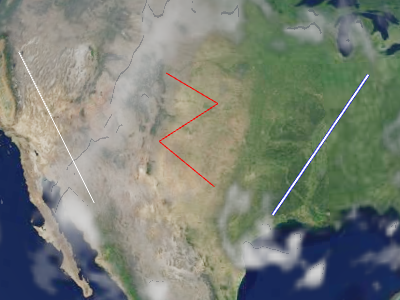
Example polylines
Polylines are added and removed from the collection using
PolylineCollection#add
和 PolylineCollection#remove .
Performance:
For best performance, prefer a few collections, each with many polylines, to 许多收藏,每个只有几条多线. 组织收藏以便多线 同一更新频率的集合中为 i.e .,不包含的多线 更改应该在一个集合中;改变每个框架的多线应该在另一个集合中 收藏; 等.
| Name | Type | Description | ||||||||||||||||
|---|---|---|---|---|---|---|---|---|---|---|---|---|---|---|---|---|---|---|
options |
object |
optional
下列属性的对象 :
|
Example:
// Create a polyline collection with two polylines
const polylines = new Cesium.PolylineCollection();
polylines.add({
  positions : Cesium.Cartesian3.fromDegreesArray([
    -75.10, 39.57,
    -77.02, 38.53,
    -80.50, 35.14,
    -80.12, 25.46]),
  width : 2
});

polylines.add({
  positions : Cesium.Cartesian3.fromDegreesArray([
    -73.10, 37.57,
    -75.02, 36.53,
    -78.50, 33.14,
    -78.12, 23.46]),
  width : 4
});
See:
Members
绘制原始中每个绘图命令的边框.
-
Default Value:
false
PolylineCollection#get to iterate over all the polylines
在收藏中.
modelMatrix : Matrix4
Transforms.eastNorthUpToFixedFrame.
-
Default Value:
Matrix4.IDENTITY-
Default Value:
true
Methods
add(options) → Polyline
Performance:
After calling add, PolylineCollection#update is called and
收藏的顶点缓冲器被重写 - 一个 O(n) 操作,它也导致 CPU 到 GPU % 管理.
对于最佳性能,在拨打 NT 0 update NT 1 前,请加入尽可能多的多线.
| Name | Type | Description |
|---|---|---|
options |
object | optional A template describing the polyline's properties as shown in Example 1. |
Returns:
Throws:
-
DeveloperError : This object was destroyed, i.e., destroy() was called.
Example:
// Example 1:  Add a polyline, specifying all the default values.
const p = polylines.add({
  show : true,
  positions : ellipsoid.cartographicArrayToCartesianArray([
           Cesium.Cartographic.fromDegrees(-75.10, 39.57),
           Cesium.Cartographic.fromDegrees(-77.02, 38.53)]),
  width : 1
});
See:
| Name | Type | Description |
|---|---|---|
polyline |
Polyline | 要检查的多线. |
Returns:
Once an object is destroyed, it should not be used; calling any function other than
isDestroyed will result in a DeveloperError exception. Therefore,
assign the return value (undefined) to the object as done in the example.
Throws:
-
DeveloperError : This object was destroyed, i.e., destroy() was called.
Example:
polylines = polylines && polylines.destroy();See:
get(index) → Polyline
PolylineCollection#length to iterate over all the polylines
在收藏中.
Performance:
If polylines were removed from the collection and
PolylineCollection#update was not called, an implicit O(n)
操作完成.
| Name | Type | Description |
|---|---|---|
index |
number | 多线的零基指数. |
Returns:
Throws:
-
DeveloperError : This object was destroyed, i.e., destroy() was called.
Example:
// Toggle the show property of every polyline in the collection
const len = polylines.length;
for (let i = 0; i < len; ++i) {
  const p = polylines.get(i);
  p.show = !p.show;
}
See:
If this object was destroyed, it should not be used; calling any function other than
isDestroyed will result in a DeveloperError exception.
Returns:
true if this object was destroyed; otherwise, false.
Performance:
After calling remove, PolylineCollection#update is called and
收藏的顶点缓冲器被重写 - 一个 O(n) 操作,它也导致 CPU 到 GPU % 管理.
为了达到最佳性能,请在拨打 NT 0 update NT 1 前,尽可能删除多条多线.
如果你打算暂时隐藏一条多线,通常更高效的呼叫
Polyline#show 而不是去除和重新添加多线.
| Name | Type | Description |
|---|---|---|
polyline |
Polyline | 要删除的多线. |
Returns:
true if the polyline was removed; false if the polyline was not found in the collection.
Throws:
-
DeveloperError : This object was destroyed, i.e., destroy() was called.
Example:
const p = polylines.add(...);
polylines.remove(p);  // Returns true
See:
Performance:
O(n). It is more efficient to remove all the polylines
从收藏开始,然后添加新收藏,而不是完全创建新收藏.
Throws:
-
DeveloperError : This object was destroyed, i.e., destroy() was called.
Example:
polylines.add(...);
polylines.add(...);
polylines.removeAll();
See:
Viewer or CesiumWidget render the scene to
获得使这个原始化所需的绘图命令.
不要直接调用此函数 。 记录下来的只是 列出场景拍摄时可能宣传的例外情况:
Throws:
-
RuntimeError : Vertex texture fetch support is required to render primitives with per-instance attributes. The maximum number of vertex texture image units must be greater than zero.