Describes a two dimensional icon located at the position of the containing
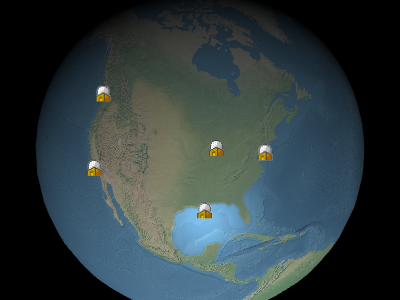
Example billboards
Entity.
Example billboards
| Name | Type | Description |
|---|---|---|
options |
BillboardGraphics.ConstructorOptions | optional 描述初始化选项的对象 |
Members
alignedAxis : Property|undefined
Gets or sets the
Cartesian3 Property specifying the unit vector axis of rotation
in the fixed frame. When set to Cartesian3.ZERO the rotation is from the top of the screen.
-
Default Value:
Cartesian3.ZERO
color : Property|undefined
Gets or sets the Property specifying the
Color that is multiplied with the image.
这有两个常用的案例。 首先,同样的白色纹理可能被许多不同的告示牌使用,
每一个颜色不同, 创建彩色广告牌。 第二,颜色的α组件可以是
used to make the billboard translucent as shown below. An alpha of 0.0 makes the billboard
透明,且 NT 0 1.0 NT 1 让公告牌不透明.
default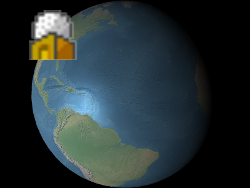 |
alpha : 0.5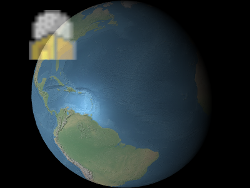 |
-
Default Value:
Color.WHITE
readonly definitionChanged : Event
当财产或次级财产被改变或修改时,获取该事件.
disableDepthTestDistance : Property|undefined
获取或设定相机的距离,以禁用深度测试,例如防止对地形进行剪切.
当设定为零时,总是应用深度测试. 当设定为 Number.POSITIVE_INFINITY 时,深度测试从未应用.
distanceDisplayCondition : Property|undefined
Gets or sets the
DistanceDisplayCondition Property specifying at what distance from the camera that this billboard will be displayed.
eyeOffset : Property|undefined
Gets or sets the
Cartesian3 Property specifying the billboard's offset in eye coordinates.
眼坐标是一个左手坐标系统,其中 NT 0 x NT 1 指向观看者
右, NT 0 y NT 1 积分上方, NT 2 z NT 3 积分进入屏幕 .
双眼偏移通常用于在同一位置安排多个告示牌或对象, e.g 在相应的3D模型上方安排一个广告牌.
下面,广告牌的位置是地球的中心 但一个眼睛的偏移使得它总是 无论观众或地球的定位如何 都出现在地球顶部.
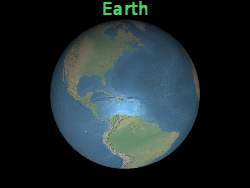 |
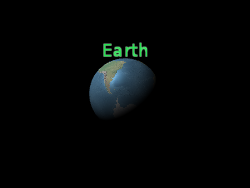 |
b.eyeOffset = new Cartesian3(0.0, 8000000.0, 0.0);
-
Default Value:
Cartesian3.ZERO
height : Property|undefined
获取或设置以像素表示告示牌高度的数值属性.
未定义时,使用本土高度.
heightReference : Property|undefined
Gets or sets the Property specifying the
HeightReference.
-
Default Value:
HeightReference.NONE
horizontalOrigin : Property|undefined
Gets or sets the Property specifying the
HorizontalOrigin.
-
Default Value:
HorizontalOrigin.CENTER
image : Property|undefined
Gets or sets the Property specifying the Image, URI, or Canvas to use for the billboard.
imageSubRegion : Property|undefined
Gets or sets the Property specifying a
BoundingRectangle that defines a
sub-region of the image to use for the billboard, rather than the entire image,
从左下方以像素计量.
pixelOffset : Property|undefined
Gets or sets the
告示牌的起源以黄点表示.
Cartesian2 Property specifying the billboard's pixel offset in screen space
从这个广告牌的起源。 这通常用于对齐多个公告牌和标签
the same position, e.g., an image and text. The screen space origin is the top, left corner of the
画布; NT 0 x NT 1 由左向右增加, NT 2 y NT 3 由上向下增加.
default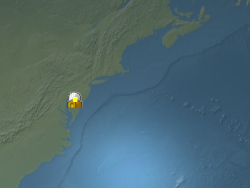 |
b.pixeloffset = new Cartesian2(50, 25);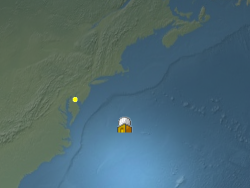 |
-
Default Value:
Cartesian2.ZERO
pixelOffsetScaleByDistance : Property|undefined
Gets or sets
NearFarScalar Property specifying the pixel offset of the billboard based on the distance from the camera.
A billboard's pixel offset will interpolate between the NearFarScalar#nearValue and
NearFarScalar#farValue while the camera distance falls within the lower and upper bounds
of the specified NearFarScalar#near and NearFarScalar#far.
在这些范围之外,广告牌的像素偏移仍被夹在最接近的界限上.
rotation : Property|undefined
获取或设置指定图像旋转的数值属性
逆时针从 NT 0 accessAxis NT 1 .
-
Default Value:
0
scale : Property|undefined
获取或设置指定适用于图像的统一比例尺的数字属性.
大于 NT 0 1.0 NT 1 1 的标码会放大公告牌,而小于 NT 2 1.0 NT 3 的标码会缩小它.
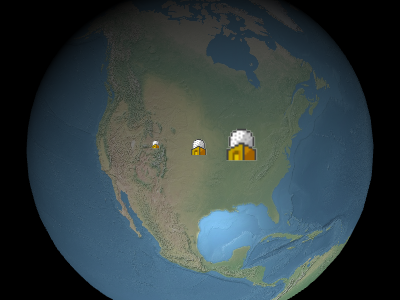
以上画面中从左到右分别是 NT+0 0.5 NT+1 , NT+2 1.0 NT+3 ,和 NT+4 2.0 NT+5 .
以上画面中从左到右分别是 NT+0 0.5 NT+1 , NT+2 1.0 NT+3 ,和 NT+4 2.0 NT+5 .
-
Default Value:
1.0
scaleByDistance : Property|undefined
Gets or sets
NearFarScalar Property specifying the scale of the billboard based on the distance from the camera.
A billboard's scale will interpolate between the NearFarScalar#nearValue and
NearFarScalar#farValue while the camera distance falls within the lower and upper bounds
of the specified NearFarScalar#near and NearFarScalar#far.
在这些范围之外,广告牌的标尺仍被夹在距离最近的界限上.
show : Property|undefined
获取或设置指定公告牌知名度的布尔属性.
-
Default Value:
true
sizeInMeters : Property|undefined
获取或设置布尔属性, 指定此公告牌的大小是否会用米测量 .
-
Default Value:
false
splitDirection : Property|undefined
Gets or sets the Property specifying the
SplitDirection of this billboard.
-
Default Value:
SplitDirection.NONE
translucencyByDistance : Property|undefined
Gets or sets
NearFarScalar Property specifying the translucency of the billboard based on the distance from the camera.
A billboard's translucency will interpolate between the NearFarScalar#nearValue and
NearFarScalar#farValue while the camera distance falls within the lower and upper bounds
of the specified NearFarScalar#near and NearFarScalar#far.
在这些范围之外,广告牌的透明度仍然被限制在最接近的界限上.
verticalOrigin : Property|undefined
Gets or sets the Property specifying the
VerticalOrigin.
-
Default Value:
VerticalOrigin.CENTER
width : Property|undefined
获取或设置以像素表示的广告牌宽度的数值属性.
未定义时, 使用本地宽度 .
Methods
clone(result) → BillboardGraphics
重复这个例子.
| Name | Type | Description |
|---|---|---|
result |
BillboardGraphics | optional 存储结果的对象 . |
Returns:
未提供修改的结果参数或新实例 .
指定该对象上每个未指定属性的值
- 提供源对象上的同一财产.
| Name | Type | Description |
|---|---|---|
source |
BillboardGraphics | 要合并成此天体的对象. |
Type Definitions
Billboard Graphics 构建器的初始化选项
Properties:
| Name | Type | Attributes | Default | Description |
|---|---|---|---|---|
show |
Property | boolean |
<optional> |
true | A boolean Property specifying the visibility of the billboard. |
image |
Property | string | HTMLImageElement | HTMLCanvasElement |
<optional> |
A Property specifying the Image, URI, or Canvas to use for the billboard. | |
scale |
Property | number |
<optional> |
1.0 | 指定适用于图像大小的尺度的数字属性. |
pixelOffset |
Property | Cartesian2 |
<optional> |
Cartesian2.ZERO | A Cartesian2 Property specifying the pixel offset. |
eyeOffset |
Property | Cartesian3 |
<optional> |
Cartesian3.ZERO | A Cartesian3 Property specifying the eye offset. |
horizontalOrigin |
Property | HorizontalOrigin |
<optional> |
HorizontalOrigin.CENTER | A Property specifying the HorizontalOrigin. |
verticalOrigin |
Property | VerticalOrigin |
<optional> |
VerticalOrigin.CENTER | A Property specifying the VerticalOrigin. |
heightReference |
Property | HeightReference |
<optional> |
HeightReference.NONE | A Property specifying what the height is relative to. |
color |
Property | Color |
<optional> |
Color.WHITE | A Property specifying the tint Color of the image. |
rotation |
Property | number |
<optional> |
0 | A numeric Property specifying the rotation about the alignedAxis. |
alignedAxis |
Property | Cartesian3 |
<optional> |
Cartesian3.ZERO | A Cartesian3 Property specifying the unit vector axis of rotation. |
sizeInMeters |
Property | boolean |
<optional> |
一个布尔属性, 指定该公告牌的大小是否应该用米测量 . | |
width |
Property | number |
<optional> |
一个数字属性,以像素表示广告牌的宽度,凌驾于本地大小之上. | |
height |
Property | number |
<optional> |
一个数字属性,在像素中指定广告牌的高度,凌驾于本地大小之上. | |
scaleByDistance |
Property | NearFarScalar |
<optional> |
A NearFarScalar Property used to scale the point based on distance from the camera. |
|
translucencyByDistance |
Property | NearFarScalar |
<optional> |
A NearFarScalar Property used to set translucency based on distance from the camera. |
|
pixelOffsetScaleByDistance |
Property | NearFarScalar |
<optional> |
A NearFarScalar Property used to set pixelOffset based on distance from the camera. |
|
imageSubRegion |
Property | BoundingRectangle |
<optional> |
一个属性指定 BoundingRectangle 定义用于公告牌的图像的子区域,而不是整个图像,用左下方的像素测量. |
|
distanceDisplayCondition |
Property | DistanceDisplayCondition |
<optional> |
指定此公告牌显示距离相机的属性 . | |
disableDepthTestDistance |
Property | number |
<optional> |
指定从相机到深度测试的距离的属性 . | |
splitDirection |
Property | SplitDirection |
<optional> |
A Property specifying the SplitDirection of the billboard. |