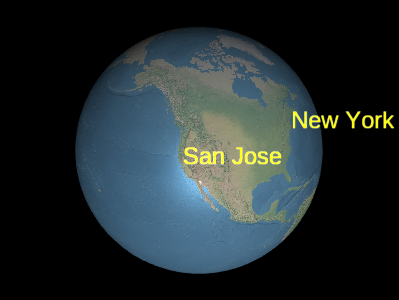
Example labels
Labels are added and removed from the collection using
LabelCollection#add
和 LabelCollection#remove .
Performance:
For best performance, prefer a few collections, each with many labels, to 许多收藏,每个只有几个标签. 避免收藏一些 标签更改每个框架, 其它框架不更改; 相反, 创建一个或多个收藏 用于静态标签,以及用于动态标签的一个或多个集合.
| Name | Type | Description | ||||||||||||||||||||||||||||||||
|---|---|---|---|---|---|---|---|---|---|---|---|---|---|---|---|---|---|---|---|---|---|---|---|---|---|---|---|---|---|---|---|---|---|---|
options |
object |
optional
下列属性的对象 :
|
Example:
// Create a label collection with two labels
const labels = scene.primitives.add(new Cesium.LabelCollection());
labels.add({
  position : new Cesium.Cartesian3(1.0, 2.0, 3.0),
  text : 'A label'
});
labels.add({
  position : new Cesium.Cartesian3(4.0, 5.0, 6.0),
  text : 'Another label'
});
Demo:
See:
Members
blendOption : BlendOption
-
Default Value:
-NT=0=- 翻译:
This setting only applies when a label's
Label#disableDepthTestDistance value would
otherwise allow depth testing—i.e., distance from the camera to the label is less than the
label's Label#disableDepthTestDistance value.
绘制原始中每个绘图命令的边框.
-
Default Value:
false
LabelCollection#get to iterate over all the labels
在收藏中.
modelMatrix : Matrix4
Transforms.eastNorthUpToFixedFrame.
-
Default Value:
Matrix4.IDENTITYExample:
const center = Cesium.Cartesian3.fromDegrees(-75.59777, 40.03883);
labels.modelMatrix = Cesium.Transforms.eastNorthUpToFixedFrame(center);
labels.add({
  position : new Cesium.Cartesian3(0.0, 0.0, 0.0),
  text     : 'Center'
});
labels.add({
  position : new Cesium.Cartesian3(1000000.0, 0.0, 0.0),
  text     : 'East'
});
labels.add({
  position : new Cesium.Cartesian3(0.0, 1000000.0, 0.0),
  text     : 'North'
});
labels.add({
  position : new Cesium.Cartesian3(0.0, 0.0, 1000000.0),
  text     : 'Up'
});-
Default Value:
true
Label#heightReference value
of HeightReference.CLAMP_TO_GROUND or HeightReference.CLAMP_TO_TERRAIN are depth tested
对三个关键点。 这将确保如果标签的任何关键点可见,则整个
标签将可见。 当设定为 NT 0 0 NT 1 时,此特性已禁用,并部分为 a
将地形后面的标签剪切.
This setting only applies when a labels's
Label#disableDepthTestDistance value would
otherwise allow depth testing—i.e., distance from the camera to the label is less than the
labels's Label#disableDepthTestDistance value.
Methods
add(options) → Label
Performance:
Calling add is expected constant time. However, the collection's vertex buffer
正在重写; 此操作为 NT 0 O( n) NT 1 , 并发生
CPU to GPU overhead. For best performance, add as many billboards as possible before
calling update.
| Name | Type | Description |
|---|---|---|
options |
Label.ConstructorOptions | optional 例1所示描述标签属性的模板. |
Returns:
Throws:
-
DeveloperError : This object was destroyed, i.e., destroy() was called.
Examples:
// Example 1:  Add a label, specifying all the default values.
const l = labels.add({
  show : true,
  position : Cesium.Cartesian3.ZERO,
  text : '',
  font : '30px sans-serif',
  fillColor : Cesium.Color.WHITE,
  outlineColor : Cesium.Color.BLACK,
  outlineWidth : 1.0,
  showBackground : false,
  backgroundColor : new Cesium.Color(0.165, 0.165, 0.165, 0.8),
  backgroundPadding : new Cesium.Cartesian2(7, 5),
  style : Cesium.LabelStyle.FILL,
  pixelOffset : Cesium.Cartesian2.ZERO,
  eyeOffset : Cesium.Cartesian3.ZERO,
  horizontalOrigin : Cesium.HorizontalOrigin.LEFT,
  verticalOrigin : Cesium.VerticalOrigin.BASELINE,
  scale : 1.0,
  translucencyByDistance : undefined,
  pixelOffsetScaleByDistance : undefined,
  heightReference : HeightReference.NONE,
  distanceDisplayCondition : undefined
});
// Example 2: Specify only the label's cartographic position,
// text, and font.
const l = labels.add({
position : Cesium.Cartesian3.fromRadians(longitude, latitude, height),
text : 'Hello World',
font : '24px Helvetica',
});See:
| Name | Type | Description |
|---|---|---|
label |
Label | 要检查的标签 . |
Returns:
See:
Once an object is destroyed, it should not be used; calling any function other than
isDestroyed will result in a DeveloperError exception. Therefore,
assign the return value (undefined) to the object as done in the example.
Throws:
-
DeveloperError : This object was destroyed, i.e., destroy() was called.
Example:
labels = labels && labels.destroy();See:
get(index) → Label
LabelCollection#length to iterate over all the labels
在收藏中.
Performance:
Expected constant time. If labels were removed from the collection and
Scene#render was not called, an implicit O(n)
操作完成.
| Name | Type | Description |
|---|---|---|
index |
number | 公告牌百强单曲榜零基指数. |
Returns:
Throws:
-
DeveloperError : This object was destroyed, i.e., destroy() was called.
Example:
// Toggle the show property of every label in the collection
const len = labels.length;
for (let i = 0; i < len; ++i) {
  const l = billboards.get(i);
  l.show = !l.show;
}
See:
If this object was destroyed, it should not be used; calling any function other than
isDestroyed will result in a DeveloperError exception.
Returns:
Performance:
Calling remove is expected constant time. However, the collection's vertex buffer
is rewritten - an O(n) operation that also incurs CPU to GPU overhead. For
最佳性能,在拨打 NT 0 update NT 1 前删除尽可能多的标签.
如果打算暂时隐藏标签,通常更高效的调用
Label#show 而不是删除和重新添加标签.
| Name | Type | Description |
|---|---|---|
label |
Label | 要删除的标签 . |
Returns:
true if the label was removed; false if the label was not found in the collection.
Throws:
-
DeveloperError : This object was destroyed, i.e., destroy() was called.
Example:
const l = labels.add(...);
labels.remove(l);  // Returns true
See:
Performance:
O(n). It is more efficient to remove all the labels
从收藏开始,然后添加新收藏,而不是完全创建新收藏.
Throws:
-
DeveloperError : This object was destroyed, i.e., destroy() was called.
Example:
labels.add(...);
labels.add(...);
labels.removeAll();