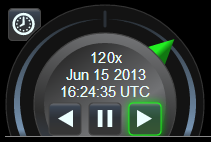
 NT 0 动画部件
动画部件提供了播放、暂停和反向的按钮,以及 当前的时间和日期,周围是用于控制动画速度的"shuttle ring".
"shuttle ring"的概念是从视频编辑中借来的,其中典型的是一个 "jog wheel"可以旋转,以非常缓慢地移动过去的个人动画帧,以及 周围的航天飞机环可扭曲,以控制快速回放的方向和速度. Cesium 通常将时间视为连续时间(不突破为预定义的动画框), 所以这个部件不会提供慢跑轮。 相反,太空梭环 能够快速和 非常缓慢的回放。 单击并拖动穿梭环指针本身(上方为绿色), 或单击环状区域的其他部分,使指针向该方向向下一个预设速度倾斜.
动画部件还提供了保留“实时”按钮(在左上方) 动画时间与终端用户的系统时钟同步, 通常显示 "today" or "right now." This mode is not available in
ClockRange.CLAMPED or
ClockRange.LOOP_STOP mode if the current time is outside of Clock's startTime and endTime.
| Name | Type | Description |
|---|---|---|
container |
Element | string | The DOM element or ID that will contain the widget. |
viewModel |
AnimationViewModel | 此部件使用的视图模式 . |
Throws:
-
DeveloperError : Element with id "container" does not exist in the document.
Example:
// In HTML head, include a link to Animation.css stylesheet,
// and in the body, include: <div id="animationContainer"></div>

const clock = new Cesium.Clock();
const clockViewModel = new Cesium.ClockViewModel(clock);
const viewModel = new Cesium.AnimationViewModel(clockViewModel);
const widget = new Cesium.Animation('animationContainer', viewModel);

function tick() {
    clock.tick();
    requestAnimationFrame(tick);
}
requestAnimationFrame(tick);
See:
Members
得到母容器.
readonly viewModel : AnimationViewModel
获得观音模型.