Create labels by calling
LabelCollection#add. Do not call the constructor directly.
| Name | Type | Description |
|---|---|---|
options |
Label.ConstructorOptions | 描述初始化选项的对象 |
labelCollection |
LabelCollection | 标签收集实例 |
Throws:
-
DeveloperError : translucencyByDistance.far must be greater than translucencyByDistance.near
-
DeveloperError : pixelOffsetScaleByDistance.far must be greater than pixelOffsetScaleByDistance.near
-
DeveloperError : distanceDisplayCondition.far must be greater than distanceDisplayCondition.near
Members
确定是否运行算法,将标签文本与右到左语言匹配
-
Default Value:
false
Examples:
// Example 1.
// Set a label's rightToLeft before init
Cesium.Label.enableRightToLeftDetection = true;
const myLabelEntity = viewer.entities.add({
  label: {
    id: 'my label',
    text: 'זה טקסט בעברית \n ועכשיו יורדים שורה',
  }
});
// Example 2.
const myLabelEntity = viewer.entities.add({
label: {
id: 'my label',
text: 'English text'
}
});
// Set a label's rightToLeft after init
Cesium.Label.enableRightToLeftDetection = true;
myLabelEntity.text = 'טקסט חדש';backgroundColor : Color
获取或设置此标签的背景颜色 .
-
Default Value:
new Color(0.165, 0.165, 0.165, 0.8)
backgroundPadding : Cartesian2
Gets or sets the background padding, in pixels, of this label. The
x value
控制水平的粘贴,而 NT 0 Y NT 1 值控制垂直粘贴.
-
Default Value:
new Cartesian2(7, 5)
获取或设定与相机的距离,超出该距离后,深度测试即被禁用——例如,防止对地形进行剪切.
当设置为 NT 0 未定义 NT 1 或
0, the depth test is always applied. When set to Number.POSITIVE_INFINITY, the depth test is never applied.
-
Default Value:
undefined
distanceDisplayCondition : DistanceDisplayCondition
获取或设定条件, 指定此标签将显示在相机的距离 .
-
Default Value:
undefined
eyeOffset : Cartesian3
获取并设定眼坐标中这个标签应用的3D笛卡尔偏移. 眼睛坐标是左手的
坐标系统,其中 NT 0 x NT 1 指向观众的右侧, NT 2 y NT 3 指向上方,以及
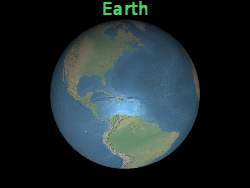
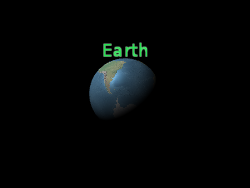
双眼偏移通常用于在同一位置排列多个标签或对象, e.g 在相应的3D模型上方安排标签.
下方的标签位于地球中心 但眼球的偏移使它永远 无论观众或地球的定位如何 都出现在地球顶部.
z points into the screen. Eye coordinates use the same scale as world and model coordinates,
这是典型的米.
双眼偏移通常用于在同一位置排列多个标签或对象, e.g 在相应的3D模型上方安排标签.
下方的标签位于地球中心 但眼球的偏移使它永远 无论观众或地球的定位如何 都出现在地球顶部.
 |
 |
l.eyeOffset = new Cartesian3(0.0, 8000000.0, 0.0);-
Default Value:
Cartesian3.ZERO
fillColor : Color
获取或设置此标签的填充颜色 .
-
Default Value:
Color.WHITE
See:
Gets or sets the font used to draw this label. Fonts are specified using the same syntax as the CSS 'font' property.
-
Default Value:
'30px sans-serif'
See:
heightReference : HeightReference
获取或设定此公告牌的高度参考.
-
Default Value:
HeightReference.NONE
horizontalOrigin : HorizontalOrigin
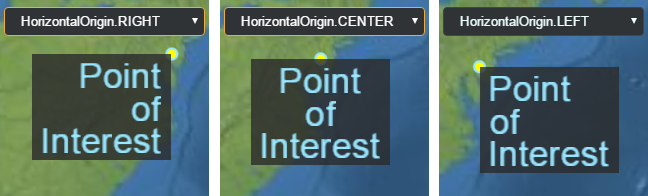
获取或设置此标签的横向来源, 以决定标签是否绘制
在它的锚位置的左、中或右侧.
-
Default Value:
HorizontalOrigin.LEFT
Example:
// Use a top, right origin
l.horizontalOrigin = Cesium.HorizontalOrigin.RIGHT;
l.verticalOrigin = Cesium.VerticalOrigin.TOP;
选择标签时获取或设置用户定义的值.
outlineColor : Color
获取或设置此标签的大纲颜色 .
-
Default Value:
Color.BLACK
See:
获取或设置此标签的大纲宽度 .
-
Default Value:
1.0
See:
pixelOffset : Cartesian2
从此标签的来源获取或设置屏幕空间中的像素偏移 。 这是常用的
用于在同一位置对齐多个标签和公告牌, e.g .,一个图像和文本. 那个
屏幕空间源是画布的顶部,左角; NT 0 x NT 1 从
左到右,和 NT 0 Y NT 1 从上到下增加.
标签的产地以黄点表示.
default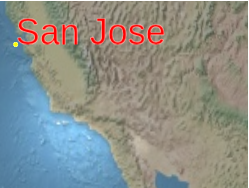 |
l.pixeloffset = new Cartesian2(25, 75);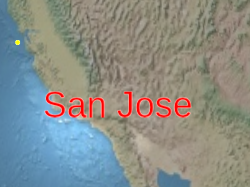 |
-
Default Value:
Cartesian2.ZERO
pixelOffsetScaleByDistance : NearFarScalar
根据标签与相机的距离,获取或设定一个标签的大小属性.
A label's pixel offset will be scaled between the
NearFarScalar#nearValue and
NearFarScalar#farValue while the camera distance falls within the lower and upper bounds
of the specified NearFarScalar#near and NearFarScalar#far.
在这些范围之外,标签的像素抵消缩放仍被夹在最接近的边框上。 如果未定义,
将禁用像素Offset ScaleByDistance .
Examples:
// Example 1.
// Set a label's pixel offset scale to 0.0 when the
// camera is 1500 meters from the label and scale pixel offset to 10.0 pixels
// in the y direction the camera distance approaches 8.0e6 meters.
text.pixelOffset = new Cesium.Cartesian2(0.0, 1.0);
text.pixelOffsetScaleByDistance = new Cesium.NearFarScalar(1.5e2, 0.0, 8.0e6, 10.0);
// Example 2.
// disable pixel offset by distance
text.pixelOffsetScaleByDistance = undefined;position : Cartesian3
获取或设置此标签的笛卡尔位置.
获取或设置与标签大小乘以像素的统一比例尺.
比例尺为 NT 0 1.0 NT 1 不改变标签大小;比例尺大于
+NT+0 1.0 NT+1 扩大标签;正比值小于 NT+2 1.0 NT+3 缩写
the label.
应用大尺度值可能会像素化标签. 为了在不像素的情况下使文本变大, use a larger font size when calling
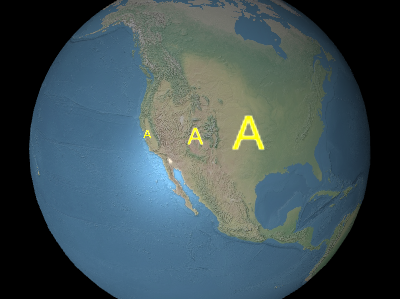
从左到右在以上图像中,比例尺为 NT 0 0.5 NT 1 , NT 2 1.0 NT Q 3 ,....., 和
应用大尺度值可能会像素化标签. 为了在不像素的情况下使文本变大, use a larger font size when calling
Label#font instead.
从左到右在以上图像中,比例尺为 NT 0 0.5 NT 1 , NT 2 1.0 NT Q 3 ,....., 和
2.0 .
-
Default Value:
1.0
scaleByDistance : NearFarScalar
根据标签与相机的距离,获取或设定一个标签的近和远的缩放属性.
A label's scale will interpolate between the
NearFarScalar#nearValue and
NearFarScalar#farValue while the camera distance falls within the lower and upper bounds
of the specified NearFarScalar#near and NearFarScalar#far.
在这些区域之外,标签的尺寸仍被限制在最接近的界限内。 如果未定义,
缩放ByDistance 将被禁用.
Examples:
// Example 1.
// Set a label's scaleByDistance to scale by 1.5 when the
// camera is 1500 meters from the label and disappear as
// the camera distance approaches 8.0e6 meters.
label.scaleByDistance = new Cesium.NearFarScalar(1.5e2, 1.5, 8.0e6, 0.0);
// Example 2.
// disable scaling by distance
label.scaleByDistance = undefined;
确定是否显示此标签。 用于隐藏或显示标签, 相反
将其删除并重新添加到收藏中.
-
Default Value:
true
确定是否显示此标签后面的背景 .
-
Default Value:
false
style : LabelStyle
获取或设置此标签的样式 .
-
Default Value:
LabelStyle.FILL
获取或设置此标签的文本 .
获得标签的总比例,即标签的比例乘以计算出来的相对大小
的字体.
-
Default Value:
1.0
translucencyByDistance : NearFarScalar
根据标签与相机的距离,获取或设定一个标签的近和远透明属性.
标签的透明度会在 {NT}\\\ 和\ \ \ \ \ \ \ \ \ \ \ \ 和\ \ \ \ \ \ \ \ \ \ \ \ \ \ 和\ \ \ \ \ \ \ \ \ 和
NearFarScalar#farValue while the camera distance falls within the lower and upper bounds
of the specified NearFarScalar#near and NearFarScalar#far.
在这些范围以外,标签的透明度仍然被限制在最接近的界限上。 如果未定义,
半透明ByDistance将被禁用 .
Examples:
// Example 1.
// Set a label's translucencyByDistance to 1.0 when the
// camera is 1500 meters from the label and disappear as
// the camera distance approaches 8.0e6 meters.
text.translucencyByDistance = new Cesium.NearFarScalar(1.5e2, 1.0, 8.0e6, 0.0);
// Example 2.
// disable translucency by distance
text.translucencyByDistance = undefined;verticalOrigin : VerticalOrigin
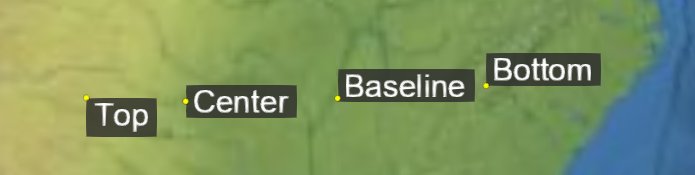
获取或设置此标签的垂直来源, 确定标签是否为
至以上,以下,或在其锚位置中心.
-
Default Value:
VerticalOrigin.BASELINE
Example:
// Use a top, right origin
l.horizontalOrigin = Cesium.HorizontalOrigin.RIGHT;
l.verticalOrigin = Cesium.VerticalOrigin.TOP;
Methods
computeScreenSpacePosition(scene, result) → Cartesian2
计算标签原产地的屏幕-空格位置,同时考虑到视线和像素偏移.
屏幕空间源是画布的顶端,左角; NT 0 x NT 1 从
左到右,和 NT 0 Y NT 1 从上到下增加.
| Name | Type | Description |
|---|---|---|
scene |
Scene | 现场的标签. |
result |
Cartesian2 | optional 存储结果的对象 . |
Returns:
标签的屏幕- 空间位置 .
Example:
console.log(l.computeScreenSpacePosition(scene).toString());See:
确定此标签是否等于另一个标签。 如果标签的所有属性都相等
平等无边. 不同收藏中的标签可以平等.
| Name | Type | Description |
|---|---|---|
other |
Label | optional 用来比较平等的标签 . |
Returns:
如果标签是相等的,则使用#NT+0 real NT+1 ;否则, NT+2 false NT+3 .
如果此对象被销毁, 返回真实; 否则, 错误 .
If this object was destroyed, it should not be used; calling any function other than
If this object was destroyed, it should not be used; calling any function other than
isDestroyed will result in a DeveloperError exception.
Returns:
如果此天体被销毁, 则属真; 否则, 属假 .
Type Definitions
标签构建器的初始化选项
Properties:
| Name | Type | Attributes | Default | Description |
|---|---|---|---|---|
position |
Cartesian3 | 标签的笛卡尔位置. | ||
id |
* |
<optional> |
A user-defined object to return when the label is picked with Scene#pick. |
|
show |
boolean |
<optional> |
true | Determines if this label will be shown. |
text |
string |
<optional> |
指定标签文本的字符串. | |
font |
string |
<optional> |
'30px sans-serif' | A string specifying the font used to draw this label. Fonts are specified using the same syntax as the CSS 'font' property. |
style |
LabelStyle |
<optional> |
LabelStyle.FILL | A LabelStyle specifying the style of the label. |
scale |
number |
<optional> |
1.0 | 一个数字,指定与标签大小相乘的统一比例尺. |
showBackground |
boolean |
<optional> |
false | Determines if a background behind this label will be shown. |
backgroundColor |
Color |
<optional> |
new Color(0.165, 0.165, 0.165, 0.8) | A Color specifying the background color of the label. |
backgroundPadding |
Cartesian2 |
<optional> |
new Cartesian2(7, 5) | A Cartesian2 Specifying the horizontal and vertical background padding in pixels. |
pixelOffset |
Cartesian2 |
<optional> |
Cartesian2.ZERO | A Cartesian2 specifying the pixel offset in screen space from the origin of this label. |
eyeOffset |
Cartesian3 |
<optional> |
Cartesian3.ZERO | A Cartesian3 specifying the 3D Cartesian offset applied to this label in eye coordinates. |
horizontalOrigin |
HorizontalOrigin |
<optional> |
HorizontalOrigin.LEFT | A HorizontalOrigin specifying the horizontal origin of this label. |
verticalOrigin |
VerticalOrigin |
<optional> |
VerticalOrigin.BASELINE | A VerticalOrigin specifying the vertical origin of this label. |
heightReference |
HeightReference |
<optional> |
HeightReference.NONE | A HeightReference specifying the height reference of this label. |
fillColor |
Color |
<optional> |
Color.WHITE | A Color specifying the fill color of the label. |
outlineColor |
Color |
<optional> |
Color.BLACK | A Color specifying the outline color of the label. |
outlineWidth |
number |
<optional> |
1.0 | 一个数字,指定标签的大纲宽度. |
translucencyByDistance |
NearFarScalar |
<optional> |
A NearFarScalar specifying near and far translucency properties of the label based on the label's distance from the camera. |
|
pixelOffsetScaleByDistance |
NearFarScalar |
<optional> |
A NearFarScalar specifying near and far pixel offset scaling properties of the label based on the label's distance from the camera. |
|
scaleByDistance |
NearFarScalar |
<optional> |
A NearFarScalar specifying near and far scaling properties of the label based on the label's distance from the camera. |
|
distanceDisplayCondition |
DistanceDisplayCondition |
<optional> |
A DistanceDisplayCondition specifying at what distance from the camera that this label will be displayed. |
|
disableDepthTestDistance |
number |
<optional> |
距离照相机的距离,超出这个距离的深度测试被禁用——例如,防止对地形进行剪切. |